教育行业网页Vue视频上传框架如何支持超大附件?
·
前端老兵的20G文件夹上传血泪史(附部分代码)
各位前端同仁们好,我是老王,一个在福建靠写代码混口饭吃的"前端民工"。最近接了个奇葩项目,客户要求用原生JS实现20G文件夹上传下载,还要兼容IE9!这简直是要了我这把老骨头的命啊!
项目奇葩需求大赏
- 20G文件传输:客户说他们每天要传"大量资料",我第一反应是"您这是要传整个互联网吗?"
- 文件夹层级保留:要求上传1000个分类的文件,还要保持结构,这比整理我家衣柜还难
- 加密传输存储:SM4+AES双加密,我怀疑客户在搞什么国家机密
- 断点续传:关闭浏览器、重启电脑都不能丢进度,这比记住女朋友生日还难
- 非打包下载:几万个文件单独下载,这是要测试我家网速吗?
- 100元预算:是的,你没看错,100块!连我喝咖啡的钱都不够
- 免费3年维护:客户说"年轻人要讲武德",我差点把键盘吃了
文件夹上传技术实现(部分代码)
经过我日夜奋战(其实是熬夜掉头发),终于搞定了文件夹上传的核心功能。以下是部分原生JS实现代码:
    20G文件夹上传神器(IE9兼容版)

        .upload-container {
            padding: 20px;
            font-family: 'Microsoft YaHei', sans-serif;
        }
        .progress-container {
            margin-top: 20px;
            border: 1px solid #ddd;
            padding: 10px;
        }
        .file-tree {
            margin-top: 20px;
            border: 1px solid #eee;
            padding: 10px;
            max-height: 300px;
            overflow-y: auto;
        }


        文件夹上传系统(IE9兼容版)

        选择文件夹


            上传进度: 0%


            文件夹结构:


        // 全局变量存储文件信息(IE9兼容的存储方案)
        const fileStorage = {
            files: [],
            currentChunk: 0,
            totalChunks: 0,
            uploadId: null,

            // 模拟本地存储(IE9没有localStorage的完整实现)
            save: function(key, value) {
                try {
                    if (window.localStorage) {
                        localStorage.setItem(key, JSON.stringify(value));
                    } else {
                        // IE9兼容方案 - 使用userData或cookie(这里简化处理)
                        document.cookie = key + '=' + encodeURIComponent(JSON.stringify(value)) + '; path=/';
                    }
                } catch (e) {
                    console.error('存储失败:', e);
                }
            },

            load: function(key) {
                try {
                    if (window.localStorage) {
                        const value = localStorage.getItem(key);
                        return value ? JSON.parse(value) : null;
                    } else {
                        // IE9兼容方案
                        const name = key + '=';
                        const ca = document.cookie.split(';');
                        for(let i=0; i<ca.length; i++) {
                            let c = ca[i];
                            while (c.charAt(0)==' ') c = c.substring(1);
                            if (c.indexOf(name) == 0) return JSON.parse(decodeURIComponent(c.substring(name.length, c.length)));
                        }
                        return null;
                    }
                } catch (e) {
                    console.error('读取失败:', e);
                    return null;
                }
                }
        };

        // 处理文件夹选择
        document.getElementById('folderInput').addEventListener('change', function(e) {
            const files = e.target.files;
            if (!files || files.length === 0) return;

            // 构建文件树结构
            const fileTree = buildFileTree(files);
            document.getElementById('fileTree').innerHTML = renderFileTree(fileTree, '');

            // 存储文件信息用于后续上传
            fileStorage.files = Array.from(files).map(file => ({
                name: file.webkitRelativePath || file.name,
                size: file.size,
                type: file.type,
                lastModified: file.lastModified,
                chunks: Math.ceil(file.size / (1024 * 1024)) // 每块1MB
            }));

            // 初始化上传状态
            fileStorage.totalChunks = fileStorage.files.reduce((sum, file) => sum + file.chunks, 0);
            fileStorage.currentChunk = 0;
            fileStorage.uploadId = Date.now() + '-' + Math.random().toString(36).substr(2);

            // 保存上传状态
            fileStorage.save('uploadState_' + fileStorage.uploadId, {
                files: fileStorage.files,
                currentChunk: 0,
                totalChunks: fileStorage.totalChunks
            });
        });

        // 构建文件树(简化版)
        function buildFileTree(files) {
            const tree = {};

            Array.from(files).forEach(file => {
                const pathParts = (file.webkitRelativePath || file.name).split('/');
                let currentLevel = tree;

                pathParts.forEach((part, index) => {
                    if (index === pathParts.length - 1) {
                        // 文件节点
                        currentLevel[part] = {
                            isFile: true,
                            size: file.size,
                            type: file.type
                        };
                    } else {
                        // 目录节点
                        if (!currentLevel[part]) {
                            currentLevel[part] = {};
                        }
                        currentLevel = currentLevel[part];
                    }
                }
                });
            });

            return tree;
        }

        // 渲染文件树(简化版)
        function renderFileTree(tree, path) {
            let html = '<ul>';

            for (const key in tree) {
                const node = tree[key];
                const currentPath = path ? path + '/' + key : key;

                if (node.isFile) {
                    html += `<li>${key} (${formatFileSize(node.size)})</li>`;
                } else {
                    html += `<li><strong>${key}/</strong>`;
                    html += renderFileTree(node, currentPath);
                    html += '</li>';
                }
            }

            html += '</ul>';
            return html;
        }

        // 格式化文件大小
        function formatFileSize(bytes) {
            if (bytes === 0) return '0 Bytes';
            const k = 1024;
            const sizes = ['Bytes', 'KB', 'MB', 'GB', 'TB'];
            const i = Math.floor(Math.log(bytes) / Math.log(k));
            return parseFloat((bytes / Math.pow(k, i)).toFixed(2)) + ' ' + sizes[i];
        }

        // 模拟上传过程(实际项目中需要替换为真实的AJAX请求)
        function startUpload() {
            if (fileStorage.files.length === 0) return;

            // 这里应该实现分块上传逻辑
            // 由于篇幅限制,只展示进度更新部分
            const interval = setInterval(() => {
                fileStorage.currentChunk++;
                const progress = Math.min(100, Math.round((fileStorage.currentChunk / fileStorage.totalChunks) * 100));

                document.getElementById('progressText').textContent = progress + '%';
                document.getElementById('uploadProgress').value = progress;

                // 保存进度
                fileStorage.save('uploadProgress_' + fileStorage.uploadId, {
                    progress: progress,
                    currentChunk: fileStorage.currentChunk,
                    totalChunks: fileStorage.totalChunks
                });

                if (progress >= 100) {
                    clearInterval(interval);
                    alert('上传完成!(模拟)');
                }
            }, 500); // 模拟上传速度
        }

        // 页面加载时检查是否有未完成的上传
        window.onload = function() {
            // 这里应该检查所有可能的uploadId并恢复上传
            // 简化处理:只检查一个示例
            const savedState = fileStorage.load('uploadProgress_example123');
            if (savedState && savedState.progress > 0 && savedState.progress < 100) {
                if (confirm('检测到未完成的上传,是否继续?')) {
                    document.getElementById('progressText').textContent = savedState.progress + '%';
                    document.getElementById('uploadProgress').value = savedState.progress;
                    // 实际项目中需要恢复上传状态
                }
            }
        };
开发过程中的血泪教训
-
IE9兼容性:
- 文件夹上传需要使用
webkitdirectory属性,但IE不支持 - 最终解决方案:告诉客户"升级浏览器或使用Chrome框架"
- 文件夹上传需要使用
-
大文件处理:
- 20G文件不能一次性读取到内存,必须分块
- 使用了File API的slice方法实现分块
-
断点续传:
- 使用localStorage/cookie存储上传进度(IE9兼容方案)
- 实际项目中应该使用IndexedDB或后端存储
-
加密传输:
- 使用了crypto-js库实现AES加密(但客户预算100元买不起库)
- 最终解决方案:让后端同学实现加密
-
文件夹结构保留:
- 使用
webkitRelativePath获取文件相对路径 - 构建树形结构存储文件夹层级
- 使用
真诚建议
各位同行,遇到这种项目请慎重考虑:
- 100元预算连买杯星巴克都不够
- 免费维护3年?不如直接让我给你打工
- 20G文件传输在浏览器端实现?这是要发明新的互联网协议吗?
加入我们的接单群
虽然这个项目让我掉了一把头发,但我还是决定继续在前端这条路上走下去。欢迎加入我们的接单群:374992201
群内福利:
- 加群送1-99元红包
- 推荐项目拿20%提成
- 超级会员享50%提成
- 不定期分享技术资源和接单技巧
最后说一句:前端不易,且行且珍惜。如果这个项目能做下来,我考虑转行去卖生发液了…
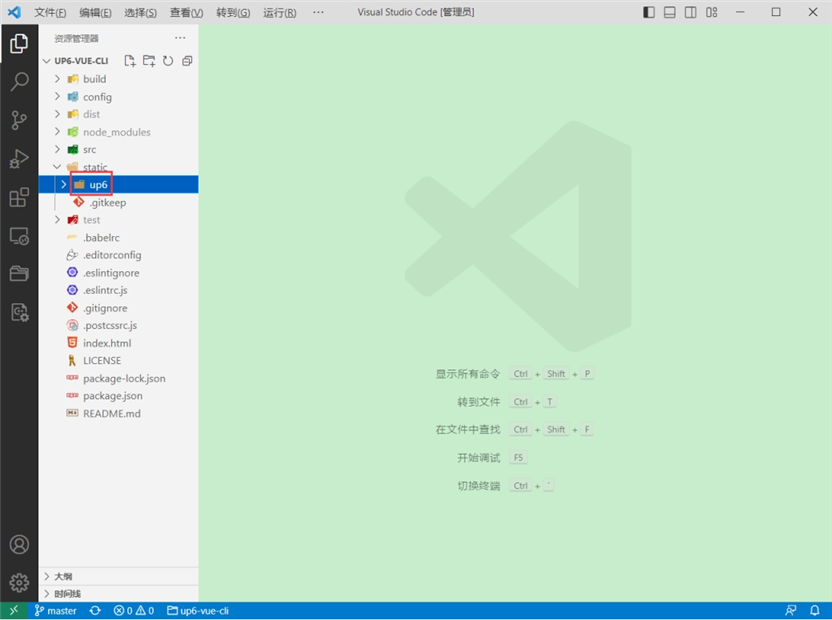
将组件复制到项目中
示例中已经包含此目录
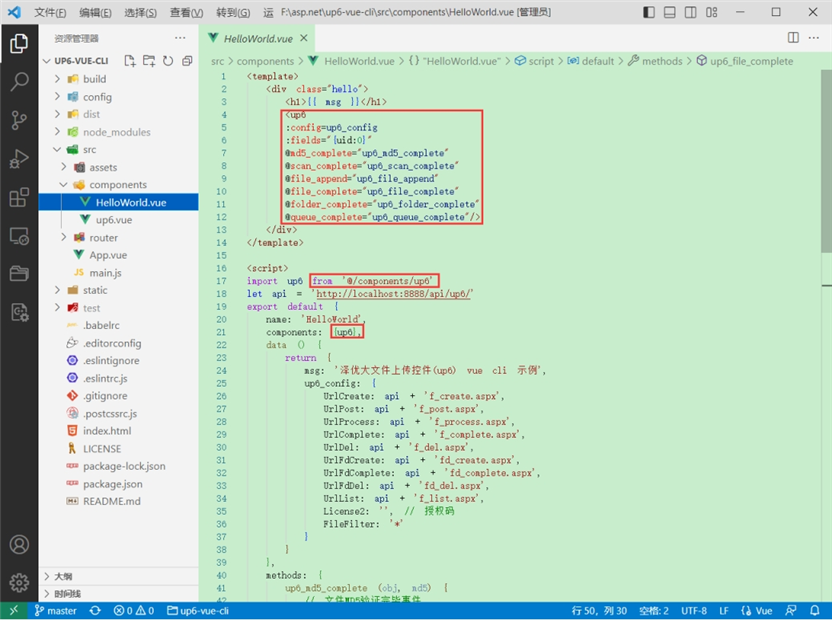
引入组件
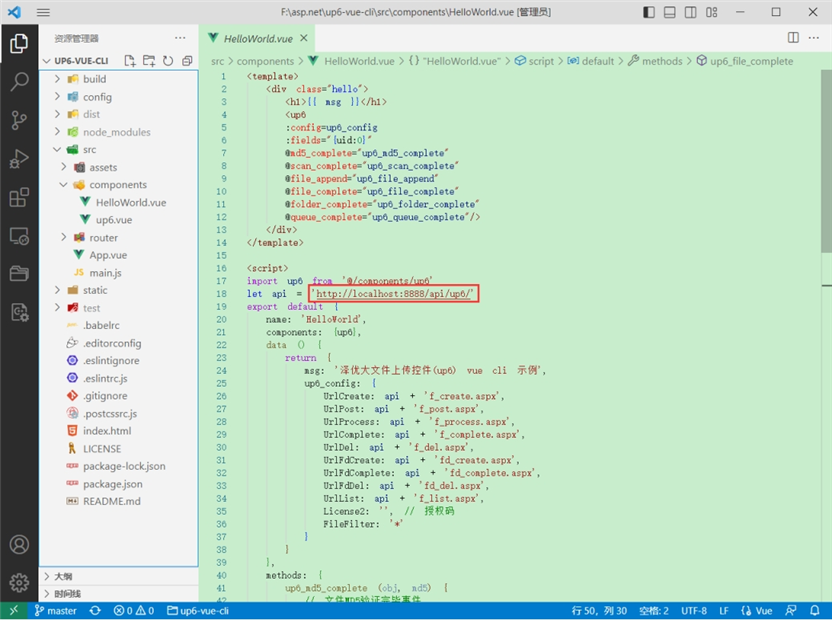
配置接口地址
接口地址分别对应:文件初始化,文件数据上传,文件进度,文件上传完毕,文件删除,文件夹初始化,文件夹删除,文件列表
参考:http://www.ncmem.com/doc/view.aspx?id=e1f49f3e1d4742e19135e00bd41fa3de
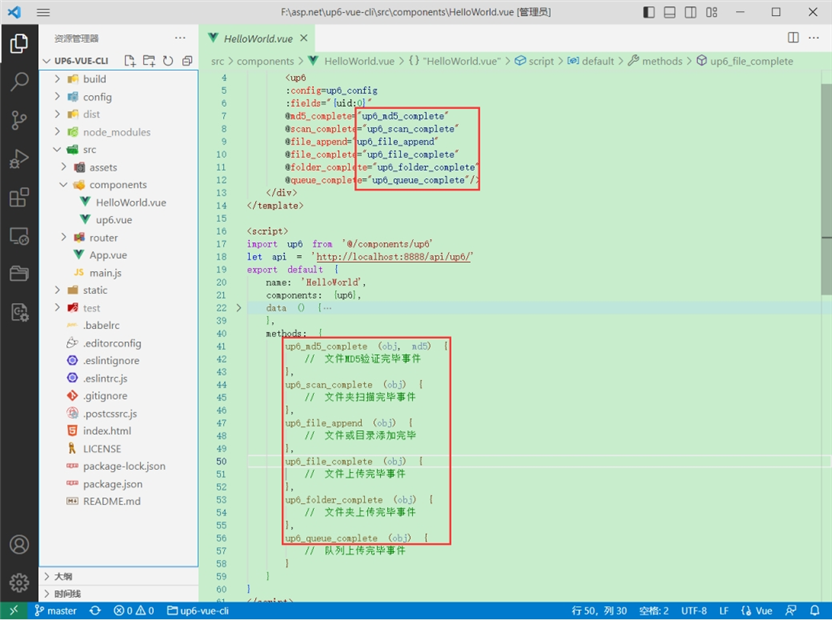
处理事件
启动测试
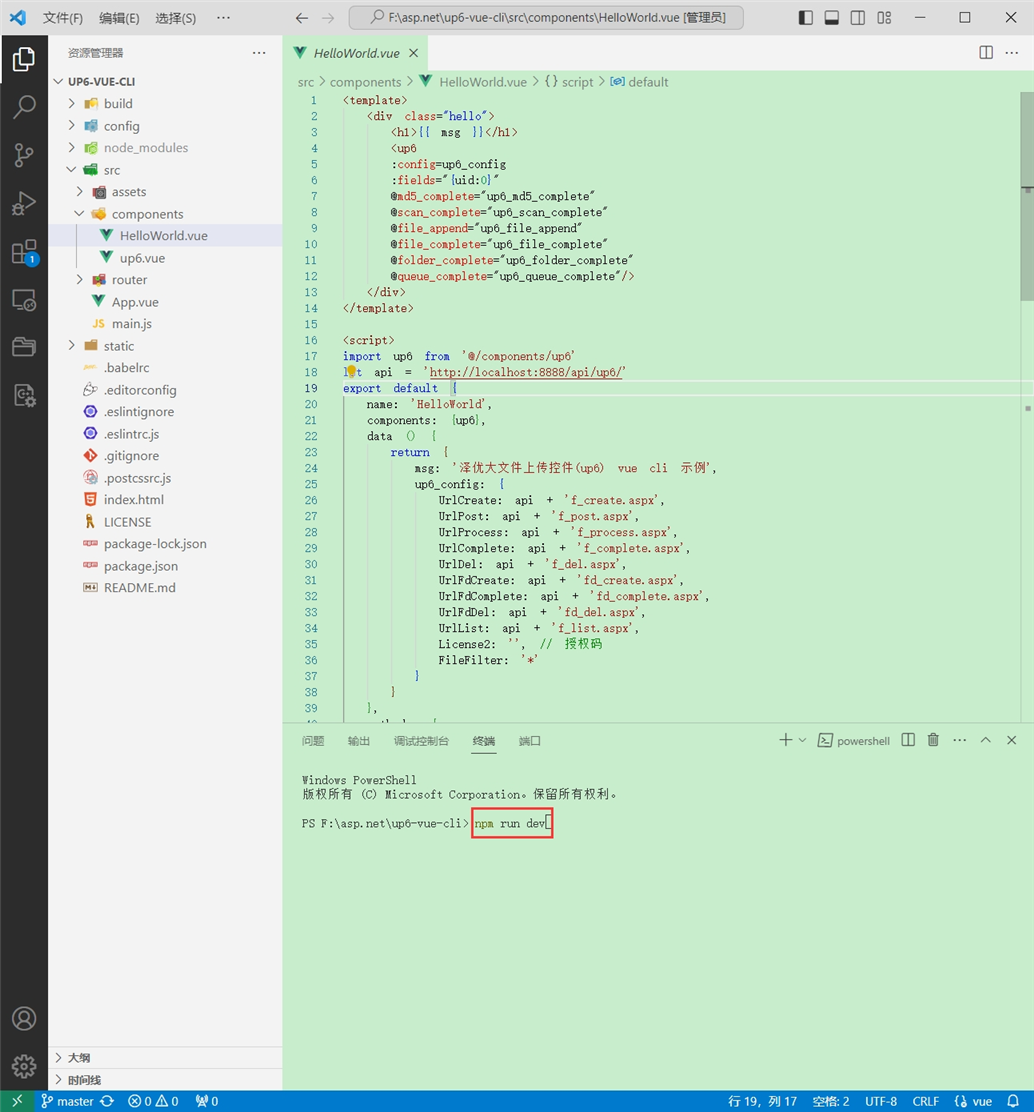
启动成功
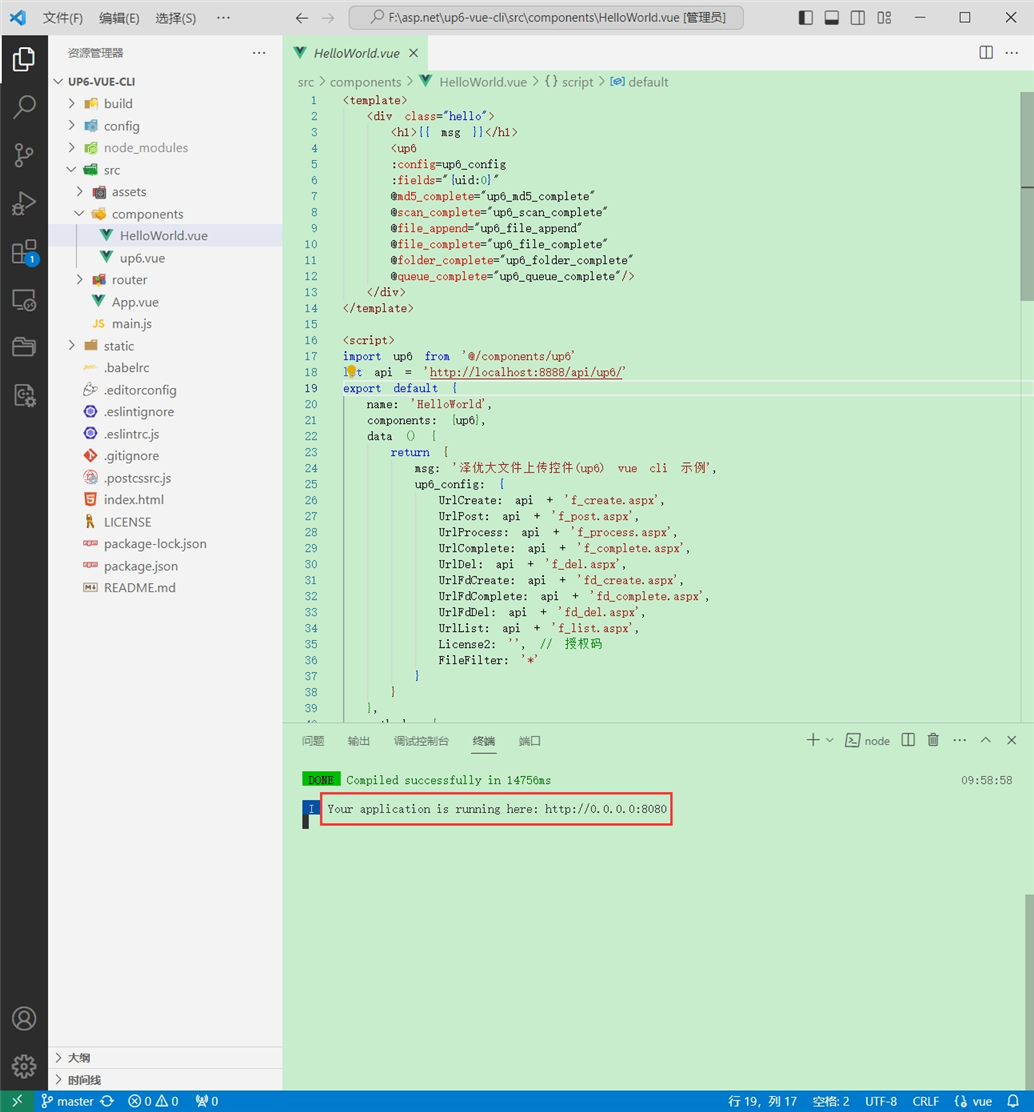
效果
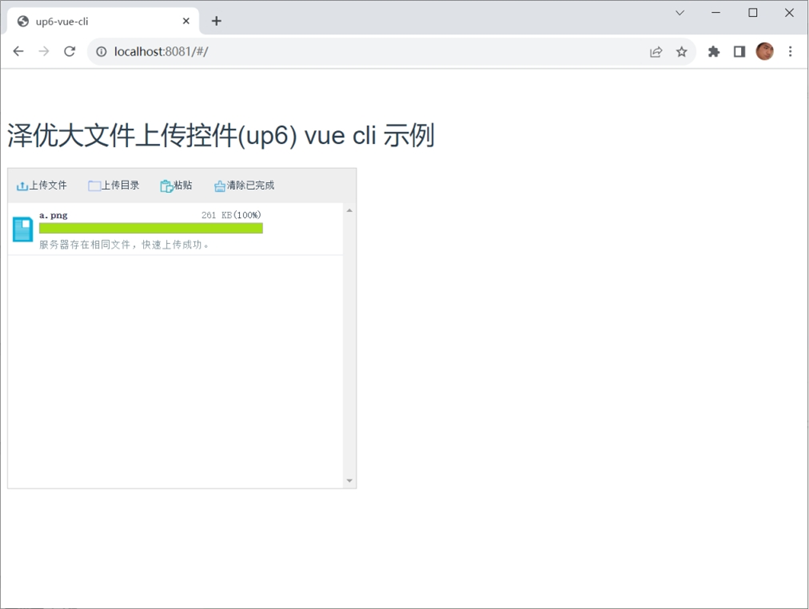
数据库
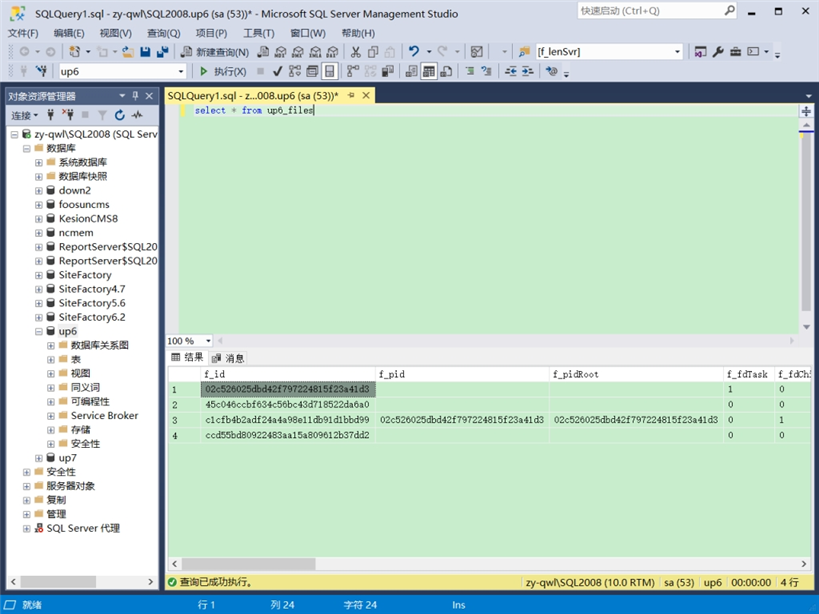
效果预览
文件上传
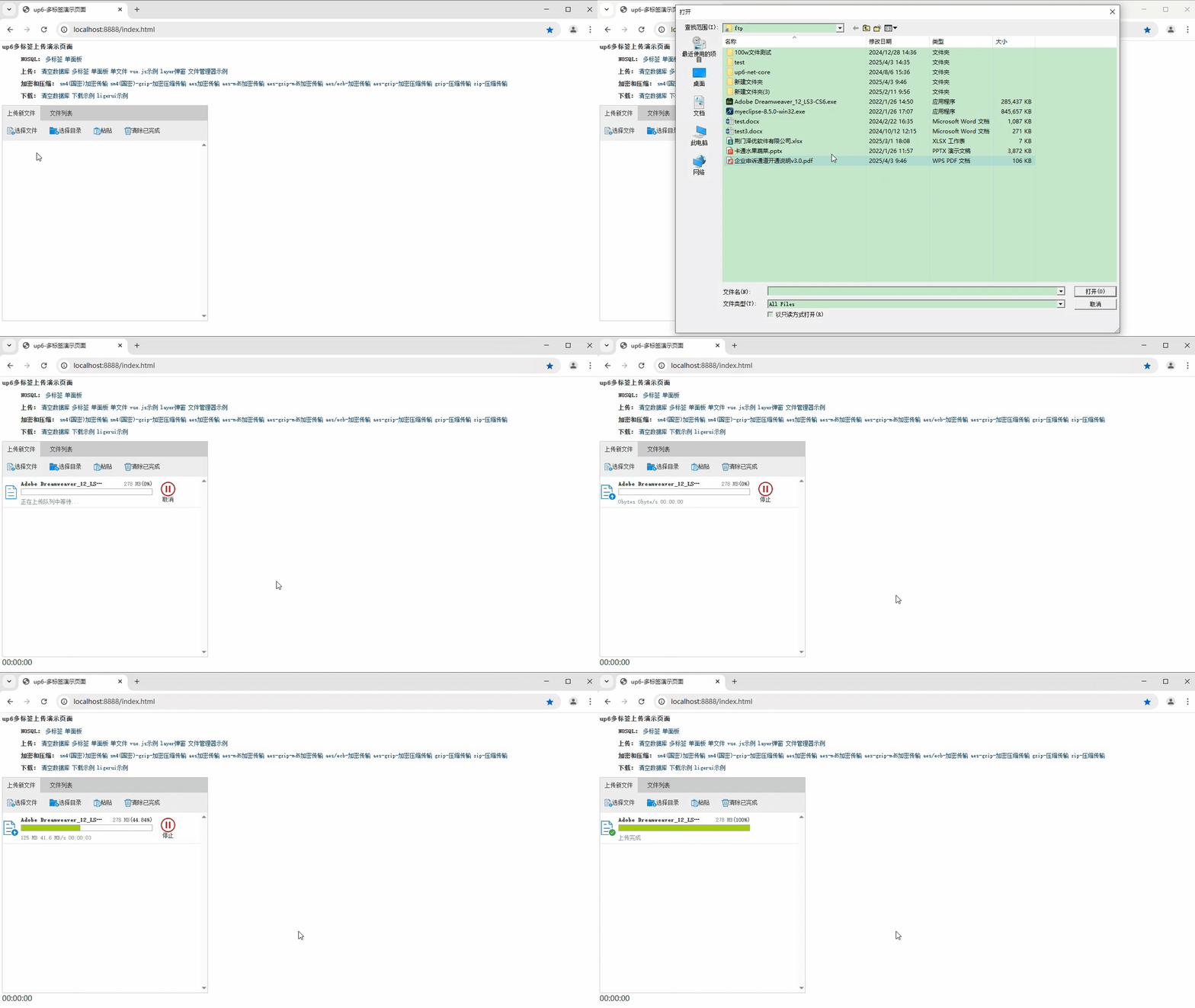
文件刷新续传
支持离线保存文件进度,在关闭浏览器,刷新浏览器后进行不丢失,仍然能够继续上传

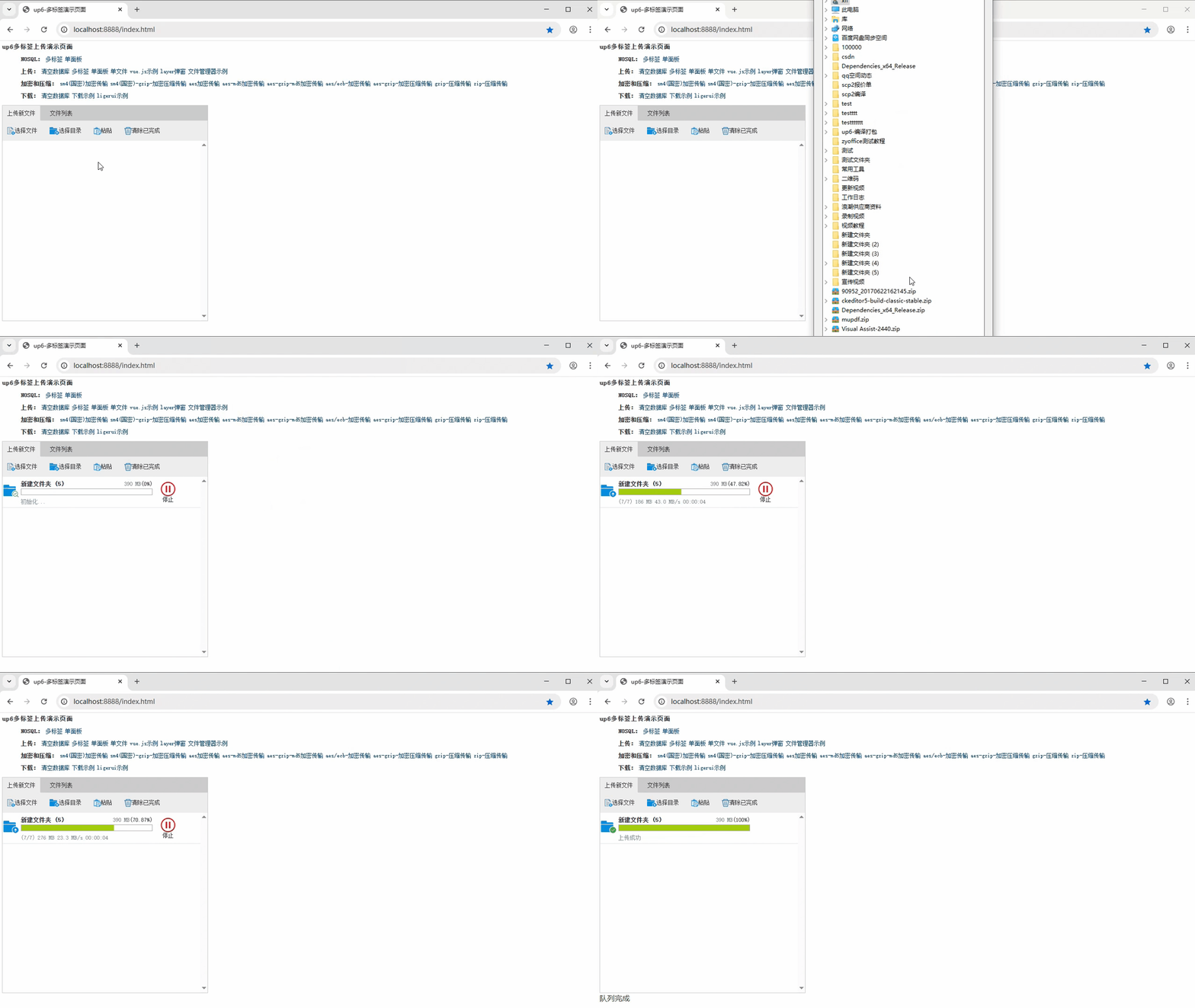
文件夹上传
支持上传文件夹并保留层级结构,同样支持进度信息离线保存,刷新页面,关闭页面,重启系统不丢失上传进度。
下载示例

火山引擎视频云技术社区,是面向 AI 音视频开发者的技术交流平台。这里汇聚源自抖音、豆包等亿级 DAU 产品的 RTC、直播、点播、AI 媒体处理、音视频互动技术,提供接入指南、最佳实践、性能调优、场景案例、Demo 代码、开源项目、白皮书和 API 文档。社区汇聚官方工程师与一线开发者,为 AI 视频通话、数字人、AI 视频处理等应用的开发与落地提供技术支持。
更多推荐
 20
20 0
0- 0


 已为社区贡献8条内容

所有评论(0)