音视频开发本地端摄像头不可用时发布占位视频流
·
web做音视频开发的时候,很容易碰到网络好,但是摄像头被占用,或者不可用的场景,导致远端订阅成功但是显示是黑屏; 这个时候有一个提示的界面就比较友好,自己和远端都能看到;
一方面自己知道了设备问题,远端也知道你设备不可用;省的去各种看日志排查问题;
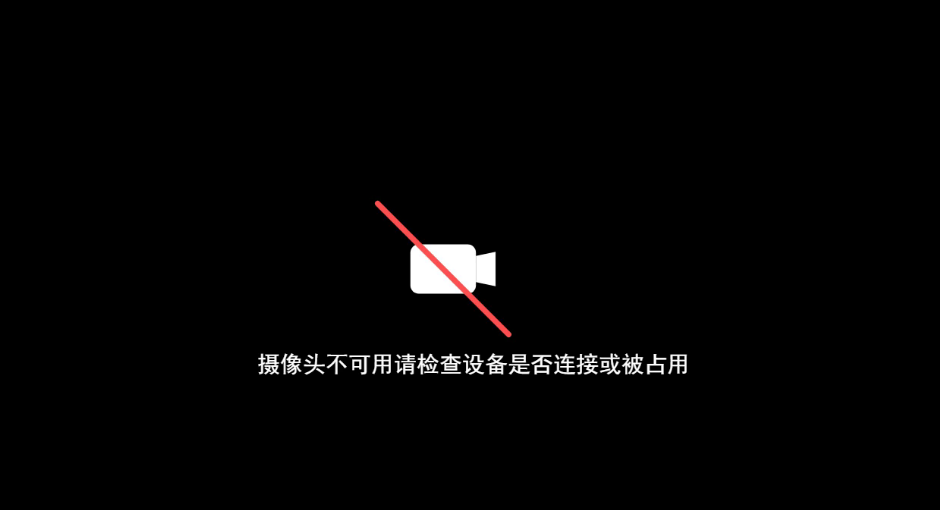
API使用方法
// 方法1:直接获取stream对象, 赋值给webRTC
const cameraStream = new CreateEmptyVideoCanvasStream().getStream();
// 方法2:自己组装一个全新的MediaStream
// 假如你的麦克风轨道是;
const micStream = await navigator.mediaDevices.getUserMedia({audio: {
	echoCancellation: { ideal: true },
	autoGainControl: { ideal: true },
	noiseSuppression: { ideal: true },
}});
// 没有摄像头或摄像头不可用时
const cameraStream = new CreateEmptyVideoCanvasStream().getStream();
// 创建一个空的MediaStream;
let mediaStream = new MediaStream();
// 添加麦克风轨道
mediaStream.addTrack(micStream .getAudioTracks()[0]);
// 添加摄像头轨道
mediaStream.addTrack(cameraStream .getVideoTracks()[0]);
封装 CreateEmptyVideoCanvasStream
为什么不用requestAnimationFrame而是使用定时器?
答:页面不可见的时候将不会执行;
为什么使用createImageBitmap?
答:减少Camvas重复绘制,保持绘制一次就够了,后面直接用图片;
class CreateEmptyVideoCanvasStream {
    constructor() {
        this.myCanvas = document.createElement('canvas');
        this.ctx = this.myCanvas.getContext('2d');
        this.startDraw();
        this.streamCanvas = this.myCanvas.captureStream(15);
        this.bindEvent();
        this.refreshTimer = null;
        this.backgroundCache = null;
    }
    // 绑定事件
    bindEvent() {
        const videoTrack =  this.streamCanvas.getVideoTracks()[0];
        if (videoTrack) {
            // 当用户手动 track.stop() 时候销毁
            videoTrack.addEventListener('ended', () => {
              this.destroy();
            });
        }
    }
    // 销毁
    destroy() {
        try {
         		this.refreshTimer && clearInterval(this.refreshTimer);
            this.refreshTimer = null;
            this.myCanvas = null;
            this.ctx = null;
            if (this.streamCanvas) {
                this.streamCanvas.getTracks().forEach(track => {
                    track.stop();
                });
            }
            this.streamCanvas = null;
            if (this.backgroundCache) {
                this.backgroundCache.close();
                this.backgroundCache = null;
            }
        } catch(error) {console.error('摄像头占用canvas销毁执行失败');}
    }
    // 获取Stream
    getStream() {
        return this.streamCanvas;
    }
    // 绘制背景
    drawBj() {
        if (!this.myCanvas || !this.ctx) {return;};
        const canvas = this.myCanvas;
        const ctx = this.ctx;
        canvas.width = 1280;  // 主画布宽度
        canvas.height = 720;  // 主画布高度
        // 2. 填充主画布背景(#5F7086)
        ctx.fillStyle = '#000';
        ctx.fillRect(0, 0, canvas.width, canvas.height);
    }
    // 绘制灰色摄像头图标
    drawGrayCameraIcon() {
        if (!this.myCanvas || !this.ctx) {return;};
        const canvas = this.myCanvas;
        const ctx = this.ctx;
        const iconWidth = 480;
        const iconHeight = 360;
        const iconX = (canvas.width - 40 - iconWidth) / 2; // 水平居中
        const iconY = (canvas.height - iconHeight) / 2; // 垂直居中
        // 保存当前绘图状态(避免缩放影响后续文字绘制)
        ctx.save();
        // 平移到图标左上角,方便后续坐标计算
        ctx.translate(iconX + 40, iconY);

        // 缩放比例:基于原始 200×200 图标,适配 480×360 区域(保证比例不拉伸)
        const scaleRatio = Math.min(iconWidth / 200, iconHeight / 200);
        ctx.scale(scaleRatio, scaleRatio);

        // 图标内部坐标(基于 200×200 画布计算)
        const centerX = 100; // 图标中心X
        const centerY = 100; // 图标中心Y
        const baseSize = 60; // 摄像头基础尺寸(控制内部比例)

        // ① 绘制摄像头主体(圆角矩形)
        function drawCameraBody() {
            const bodyW = baseSize * 0.8;
            const bodyH = baseSize * 0.6;
            const bodyX = centerX - bodyW / 2;
            const bodyY = centerY - bodyH / 2;
            const cornerRadius = 6; // 圆角大小

            // 绘制圆角矩形路径
            ctx.beginPath();
            ctx.moveTo(bodyX + cornerRadius, bodyY);
            ctx.lineTo(bodyX + bodyW - cornerRadius, bodyY);
            ctx.arcTo(bodyX + bodyW, bodyY, bodyX + bodyW, bodyY + cornerRadius, cornerRadius);
            ctx.lineTo(bodyX + bodyW, bodyY + bodyH - cornerRadius);
            ctx.arcTo(bodyX + bodyW, bodyY + bodyH, bodyX + bodyW - cornerRadius, bodyY + bodyH, cornerRadius);
            ctx.lineTo(bodyX + cornerRadius, bodyY + bodyH);
            ctx.arcTo(bodyX, bodyY + bodyH, bodyX, bodyY + bodyH - cornerRadius, cornerRadius);
            ctx.lineTo(bodyX, bodyY + cornerRadius);
            ctx.arcTo(bodyX, bodyY, bodyX + cornerRadius, bodyY, cornerRadius);
            ctx.closePath();

            // 填充浅灰色(#ddd)
            ctx.fillStyle = '#fff';
            ctx.fill();
            // 边框加深灰色(#ccc),增强轮廓
            // ctx.strokeStyle = '#333';
            // ctx.lineWidth = 2;
            // ctx.stroke();
        }

        // ② 绘制右侧梯形镜头
        function drawTrapezoidLens() {
            const bodyW = baseSize * 0.8;
            const bodyH = baseSize * 0.6;
            const bodyX = centerX - bodyW / 2;

            // 梯形参数(短边朝内,长边朝外)
            const lensH = bodyH * 0.7; // 梯形高度
            const topW = bodyW * 0.3; // 梯形顶部宽度(短边)
            const bottomW = bodyW * 0.5; // 梯形底部宽度(长边)
            const startX = bodyX + bodyW; // 与主体右侧对齐
            const startY = centerY - lensH / 2; // 垂直居中

            // 绘制梯形路径
            ctx.beginPath();
            ctx.moveTo(startX, startY + 3); // 左上
            ctx.lineTo(startX + topW, startY); // 右上
            ctx.lineTo(startX + topW, startY + lensH); // 右下
            ctx.lineTo(startX, startY + lensH - 3); // 左下
            ctx.closePath();

            // 填充与主体一致的浅灰色
            ctx.fillStyle = '#fff';
            ctx.fill();
            // 镜头边框
            // ctx.strokeStyle = '#ccc';
            // ctx.lineWidth = 2;
            // ctx.stroke();

            // 镜头内部细节(更浅的灰色,增强层次感)
            ctx.beginPath();
            ctx.moveTo(startX + 4, startY + 7);
            ctx.lineTo(startX + topW - 4, startY + 4);
            ctx.lineTo(startX + topW - 4, startY + lensH - 4);
            ctx.lineTo(startX + 4, startY + lensH - 7);
            ctx.closePath();
            ctx.fillStyle = '#fff';
            ctx.fill();
        }

        // ③ 绘制禁用斜线(红色,突出错误状态)
        function drawDisabledLine() {
            const lineOffset = baseSize * 0.8; // 斜线长度

            // 绘制主斜线(红色 #FF4D4F)
            ctx.beginPath();
            ctx.moveTo(centerX - lineOffset, centerY - lineOffset);
            ctx.lineTo(centerX + lineOffset, centerY + lineOffset);
            ctx.lineWidth = 4; // 线条粗细
            ctx.strokeStyle = '#FF4D4F';
            ctx.lineCap = 'round'; // 圆角线端,更柔和
            ctx.stroke();
        }

    // 组合绘制所有部分
    drawCameraBody();
    drawTrapezoidLens();
    drawDisabledLine();
    }
    // 绘制提示文字
    drawTipText() {
        if (!this.myCanvas || !this.ctx) {return;};
        const canvas = this.myCanvas;
        const ctx = this.ctx;
        ctx.restore();
        //  4. 在主画布底部居中绘制“摄像头创建失败”提示
        ctx.font = '30px SimHei, Heiti, sans-serif';      // 提示文字大小
        ctx.fillStyle = 'white';       // 提示文字颜色(白色更醒目)
        ctx.textAlign = 'center';      // 水平居中
        ctx.textBaseline = 'bottom';   // 文字底部对齐(避免紧贴画布边缘)
        const tipY = canvas.height - 220;  // 距离主画布底部30px
        ctx.fillText('摄像头不可用请检查设备是否连接或被占用', canvas.width / 2, tipY);
    }
    // 开始绘制
    startDraw() {
        if (!this.myCanvas || !this.ctx) {
            return;
        };
        this.drawBj();
        this.drawGrayCameraIcon();
        this.drawTipText();
        // 存入缓存
        this.createCacheCanvas();
    }
    // 创建缓存
    createCacheCanvas() {
        try {
            this.myCanvas.toBlob((blob) => {
                const newImg = document.createElement("img");
                newImg.src = URL.createObjectURL(blob);;
                newImg.onload = async () => {
                    this.backgroundCache = await createImageBitmap(newImg);
                    URL.revokeObjectURL(newImg.src);
                    this.startAnimation();
                }
            }, 'image/png')
        } catch(error) {console.log('摄像头占用canvas创建缓存失败', error);}
    }
    startAnimation() {
        // requestAnimationFrame页面不可见的时候将不会执行
        /* 测试过必须重新绘制才能实时发送给webRTC 1秒间隔足够了, 短了浪费系统资源 */
        try {
            this.refreshTimer = setInterval(() => {
                if (!this.myCanvas || !this.ctx) {
                    this.refreshTimer && clearInterval(this.refreshTimer);
                     this.refreshTimer = null;
                    return;
                };
                if (!this.backgroundCache) {
                    return;
                }
                if (!this.streamCanvas) {return;}
                const videoTrack =  this.streamCanvas.getVideoTracks()[0];
                if (!videoTrack) {
                    return;
                }
                // 表示轨道已经嘎了
                if (videoTrack.readyState === 'ended') {
                    this.destroy();
                    return;
                }
                const canvas = this.myCanvas;
                const ctx = this.ctx;
                // 重置上下文状态(关键步骤)
                ctx.save(); // 保存当前状态
                ctx.setTransform(1, 0, 0, 1, 0, 0); // 重置变换矩阵
                ctx.clearRect(0, 0, canvas.width, canvas.height); // 清空画布
                ctx.drawImage(this.backgroundCache, 0, 0);
                ctx.restore(); // 关键:恢复保存的状态,避免状态污染
            }, 200);
        } catch(error) {
            console.error('摄像头占用canvas绘制执行失败');
            this.backstopAnimation();
        }
    }
    // 保底绘制文字
    backstopAnimation() {
        try {
            this.refreshTimer = setInterval(() => {
                if (!this.myCanvas || !this.ctx) {
                    this.refreshTimer && clearInterval(this.refreshTimer);
                    this.refreshTimer = null;
                    return;
                };
                if (!this.streamCanvas) {return;}
                const videoTrack =  this.streamCanvas.getVideoTracks()[0];
                if (!videoTrack) {
                    return;
                }
                // 表示轨道已经嘎了
                if (videoTrack.readyState === 'ended') {
                    this.destroy();
                    return;
                }
                const canvas = this.myCanvas;
                const ctx = this.ctx;
                // 先保存当前状态,避免影响后续绘制(如果有的话)
                ctx.save();
                // 重置变换矩阵和清空画布,确保文字显示清晰
                ctx.setTransform(1, 0, 0, 1, 0, 0);
                ctx.clearRect(0, 0, canvas.width, canvas.height);
                // 在主画布底部居中绘制“摄像头创建失败”提示
                ctx.font = '30px SimHei, Heiti, sans-serif';      // 提示文字大小
                ctx.fillStyle = 'white';       // 提示文字颜色(白色更醒目)
                ctx.textAlign = 'center';      // 水平居中
                ctx.textBaseline = 'bottom';   // 文字底部对齐(避免紧贴画布边缘)
                const tipY = canvas.height - 220;  // 距离主画布底部30px
                ctx.fillText('摄像头不可用请检查设备是否连接或被占用', canvas.width / 2, tipY);
                // 恢复状态
                ctx.restore();
            }, 200);
        } catch(error) {
            this.refreshTimer && clearInterval(this.refreshTimer);
            this.refreshTimer = null;
            setTimeout(() => {
                if (!this.myCanvas || !this.ctx) { return; };
                if (!this.streamCanvas) {return;}
                const videoTrack =  this.streamCanvas.getVideoTracks()[0];
                if (!videoTrack) { return; }
                // 表示轨道已经嘎了
                if (videoTrack.readyState === 'ended') {
                    this.destroy();
                    return;
                }
                this.backstopAnimation();
            }, 1000)
        }
    }
}

火山引擎视频云技术社区,是面向 AI 音视频开发者的技术交流平台。这里汇聚源自抖音、豆包等亿级 DAU 产品的 RTC、直播、点播、AI 媒体处理、音视频互动技术,提供接入指南、最佳实践、性能调优、场景案例、Demo 代码、开源项目、白皮书和 API 文档。社区汇聚官方工程师与一线开发者,为 AI 视频通话、数字人、AI 视频处理等应用的开发与落地提供技术支持。
更多推荐
 15
15 0
0- 0


 已为社区贡献3条内容

所有评论(0)