【视频点播系统】Cpp-httplib 介绍及使用
·
Cpp-httplib 介绍及使用
一. Cpp-httplib 介绍
C++ HTTP 库 (cpp-httplib) 是一个轻量级的 C++ HTTP 客户端/服务器库,它提供了简单的 API 来创建 HTTP 服务器和客户端,支持同步和异步操作。
以下是一些关于 cpp-httplib 的主要特点:
- 轻量级:cpp-httplib 的设计目标是简单和轻量,只有一个头文件包含即可,不依赖于任何外部库。
- 跨平台:它支持多种操作系统,包括 Windows、Linux 和 macOS。
- 同步和异步操作:库提供了同步和异步两种操作方式,允许开发者根据需要选择。
- 支持 HTTP/1.1:它实现了 HTTP/1.1 协议,包括持久连接和管道化。
- Multipart form-data:支持发送和接收 multipart/form-data 类型的请求,这对于文件上传非常有用。
- SSL/TLS 支持:通过使用 OpenSSL 或 mbedTLS 库,cpp-httplib 支持 HTTPS 和 WSS。
- 简单易用:API 设计简洁,易于学习和使用。
- 性能:尽管是轻量级库,但性能表现良好,适合多种应用场景。
- 社区活跃:cpp-httplib 有一个活跃的社区,不断有新的功能和改进被加入。
二. Cpp-httplib 安装
git clone https://github.com/yhirose/cpp-httplib.git
克隆之后直接将其放在 /usr/include 路径下即可。
三. Cpp-httplib 类与接口
1. 核心接口
namespace httplib {
using Range = std::pair<ssize_t, ssize_t>;
using Ranges = std::vector<Range>;
// 多部分表单数据
struct MultipartFormData {
std::string name;
std::string content;
std::string filename;
std::string content_type;
};
using MultipartFormDataItems = std::vector<MultipartFormData>;
using MultipartFormDataMap = std::multimap<std::string, MultipartFormData>;
using Params = std::multimap<std::string, std::string>;
using Match = std::smatch;
// HTTP请求
struct Request {
std::string method; // HTTP方法
std::string path; // 请求路径
Headers headers; // 请求头
std::string body; // 请求体
Params params; // 查询参数
MultipartFormDataMap files; // 多部分表单数据
Ranges ranges; // 范围请求
Match matches; // 正则表达式匹配结果
};
// HTTP响应
struct Response {
std::string version; // HTTP版本
int status = -1; // HTTP状态码
std::string reason; // HTTP状态码描述
Headers headers; // 响应头
std::string body; // 响应体
void set_content(const std::string &s, const std::string &content_type); // 设置响应体内容
void set_header(const std::string &key, const std::string &val); // 设置响应头
};
// HTTP服务器
class Server {
using Handler = std::function<void(const Request &, Response &)>;
bool set_mount_point(const std::string &mount_point, const std::string &dir, Headers headers = Headers()); // 设置挂载点
Server &Get(const std::string &pattern, Handler handler); // 注册GET请求处理函数
Server &Post(const std::string &pattern, Handler handler); // 注册POST请求处理函数
Server &Put(const std::string &pattern, Handler handler); // 注册PUT请求处理函数
Server &Delete(const std::string &pattern, Handler handler); // 注册DELETE请求处理函数
bool listen(const std::string &host, int port); // 监听指定主机和端口
}
// HTTP客户端
class Client {
explicit Client(const std::string &host, int port); // 构造函数
Result Get(const std::string &path, const Headers &headers); // 发送GET请求
Result Get(const std::string &path, const Params ¶ms, const Headers &headers, Progress progress = nullptr); // 发送GET请求
Result Post(const std::string &path, const std::string &body, const std::string &content_type); // 发送POST请求
Result Post(const std::string &path, const Params ¶ms); // 发送POST请求
Result Post(const std::string &path, const Headers &headers, const Params ¶ms); // 发送POST请求
Result Post(const std::string &path, const MultipartFormDataItems &items);
Result Put(const std::string &path, const std::string &body, const std::string &content_type); // 发送PUT请求
Result Delete(const std::string &path, const std::string &body, const std::string &content_type); // 发送DELETE请求
}
// HTTP客户端请求结果
class Result {
operator bool() const { return res_ != nullptr; } // 转换为bool类型,判断是否成功
const Response &value() const { return *res_; } // 获取响应对象的常量引用
Response &value() { return *res_; } // 获取响应对象的引用
const Response &operator*() const { return *res_; } // 解引用运算符,获取响应对象的常量引用
Response &operator*() { return *res_; } // 解引用运算符,获取响应对象的引用
const Response *operator->() const { return res_.get(); } // 成员访问运算符,获取响应对象的常量指针
Response *operator->() { return res_.get(); } // 成员访问运算符,获取响应对象的指针
}
}
2. 实现原理
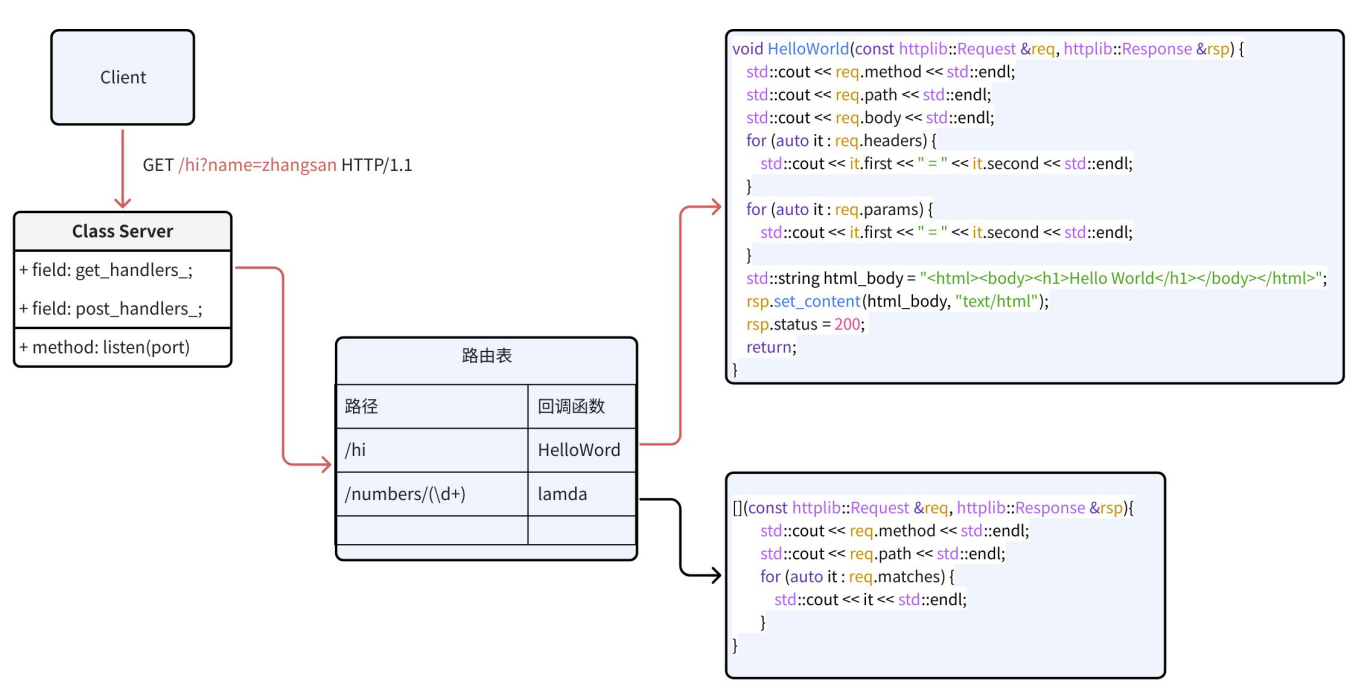
四. Cpp-httplib 使用样例
1. 目录结构
httplib/
|-- makefile
|-- serve.cc
2. 项目构建
# makefile
server: serve.cc
	g++ -o -std=c++17 $@ $^

.PHONY: clean
clean:
	rm -f server
3. 代码编写
// serve.cc
#include <httplib.h>

void HelloWorld(const httplib::Request& req, httplib::Response& res) {
    std::cout << req.method << std::endl; // 打印请求方法
    std::cout << req.path << std::endl; // 打印请求路径
    std::cout << req.body << std::endl; // 打印请求体
    for (auto it = req.headers.begin(); it != req.headers.end(); ++it) {
        std::cout << it->first << ": " << it->second << std::endl; // 打印请求头
    }
    for (auto it = req.params.begin(); it != req.params.end(); ++it) {
        std::cout << it->first << ": " << it->second << std::endl; // 打印查询参数
    }
    std::string html = "<html><body><h1>Hello, World!</h1></body></html>"; // 定义一个html字符串
    res.set_content(html, "text/html"); // 设置响应内容为html字符串
    // res.set_header("Content-Type", "text/html"); // 设置响应头为html类型
    res.status = 200; // 设置响应状态码为200
}

int main()
{
    // 1. 创建HTTP服务器对象
    httplib::Server svr;
    // 2. 注册GET请求处理函数
    svr.Get("/hi", HelloWorld);
    svr.Get(R"(/numbers/(\d+))", [](const httplib::Request& req, httplib::Response& res){
        std::cout << req.method << std::endl; // 打印请求方法
        std::cout << req.path << std::endl; // 打印请求路径
        std::cout << req.body << std::endl; // 打印请求体
        for (auto it = req.headers.begin(); it != req.headers.end(); ++it) {
            std::cout << it->first << ": " << it->second << std::endl; // 打印请求头
        }
        for (auto it = req.params.begin(); it != req.params.end(); ++it) {
            std::cout << it->first << ": " << it->second << std::endl; // 打印查询参数
        }
        for (auto it = req.matches.begin(); it != req.matches.end(); ++it) {
            std::cout << *it << std::endl; // 打印正则表达式捕获的数字
        }
    });
    // 3. 监听指定主机和端口
    svr.listen("0.0.0.0", 9000);

    return 0;
}
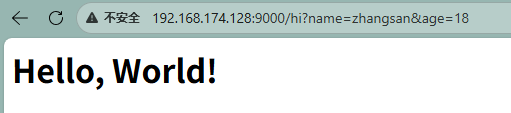
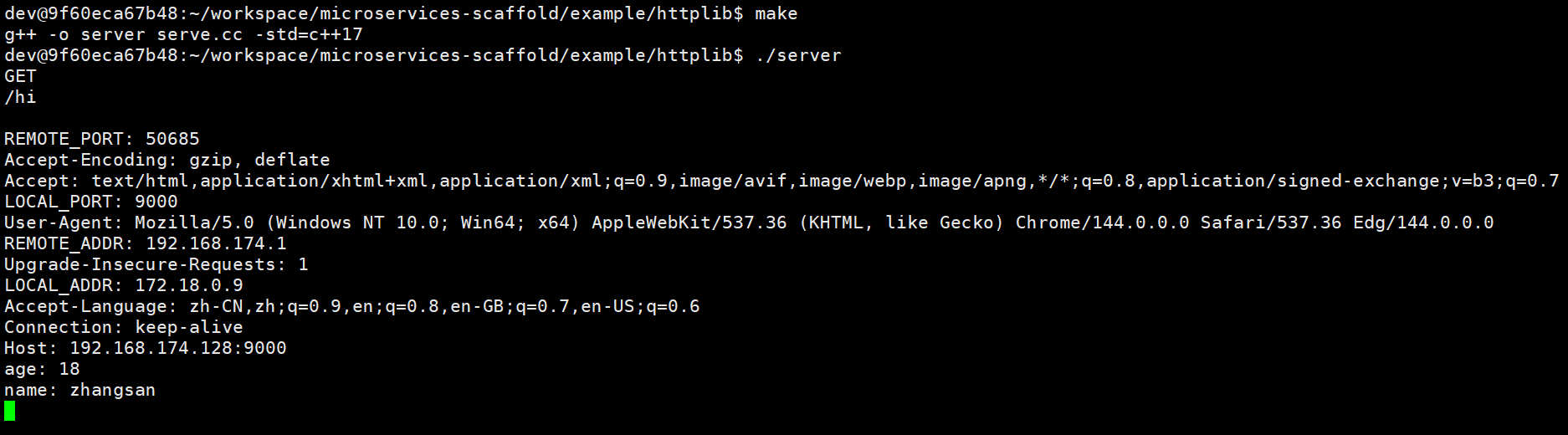

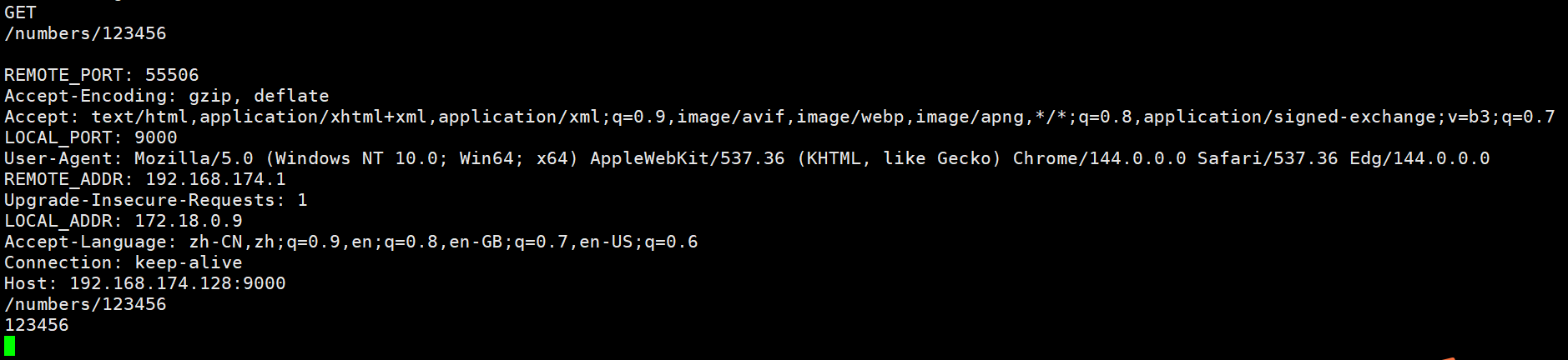

火山引擎视频云技术社区,是面向 AI 音视频开发者的技术交流平台。这里汇聚源自抖音、豆包等亿级 DAU 产品的 RTC、直播、点播、AI 媒体处理、音视频互动技术,提供接入指南、最佳实践、性能调优、场景案例、Demo 代码、开源项目、白皮书和 API 文档。社区汇聚官方工程师与一线开发者,为 AI 视频通话、数字人、AI 视频处理等应用的开发与落地提供技术支持。
更多推荐
 19
19 0
0- 0


 已为社区贡献14条内容

所有评论(0)