医疗系统PHP如何通过分片加密保障视频上传数据安全?
大文件上传下载系统开发指南
项目概述
大家好,我是广西的一名PHP程序员,最近接了个"大活"——开发一个支持20G文件上传下载的系统,还要兼容IE8这种古董浏览器。客户要求使用原生JS实现,不能依赖jQuery等库。虽然预算只有100元,但客户承诺如果做得好,后续还有更多项目。这不就是我们程序员的"福报"吗?
技术选型分析
经过深思熟虑,我决定采用以下技术方案:
- 前端:Vue3 CLI + 原生JS实现WebUploader功能(为了兼容IE8,部分功能需要降级处理)
- 后端:PHP + MySQL(预算有限,不能上高大上的框架)
- 存储:阿里云OSS(便宜大碗,适合大文件存储)
- 加密:SM4和AES双保险(虽然PHP的SM4支持需要自己造轮子)
系统功能清单
- 20G大文件上传(支持断点续传)
- 文件夹上传(保留层级结构)
- 文件/文件夹下载(非打包方式)
- SM4/AES加密传输和存储
- 断点续传(网页关闭重启也不怕)
- 兼容IE8在内的所有主流浏览器
- 前后端完整示例代码
前端实现(Vue3 + 原生JS)
1. 文件上传组件 (FileUploader.vue)
export default {
  name: 'FileUploader',
  data() {
    return {
      files: [],
      chunkSize: 5 * 1024 * 1024, // 5MB每片
      uploader: null
    }
  },
  methods: {
    triggerFileInput() {
      document.getElementById('fileInput').click();
    },

    handleFileChange(e) {
      const items = e.target.files;
      if (!items || items.length === 0) return;

      // 处理文件和文件夹
      for (let i = 0; i < items.length; i++) {
        const file = items[i];
        // 兼容IE8的webkitRelativePath处理
        const relativePath = file.webkitRelativePath || file.relativePath || file.name;

        this.files.push({
          file: file,
          name: file.name,
          size: file.size,
          relativePath: relativePath,
          progress: 0,
          uploadedChunks: 0,
          cancelled: false,
          xhr: null
        });
      }

      this.startUpload();
    },

    async startUpload() {
      for (let i = 0; i < this.files.length; i++) {
        const fileObj = this.files[i];
        if (fileObj.cancelled) continue;

        await this.uploadFile(fileObj);
      }
    },

    async uploadFile(fileObj) {
      const file = fileObj.file;
      const totalChunks = Math.ceil(file.size / this.chunkSize);
      fileObj.totalChunks = totalChunks;

      for (let chunkIndex = 0; chunkIndex < totalChunks; chunkIndex++) {
        if (fileObj.cancelled) return;

        const start = chunkIndex * this.chunkSize;
        const end = Math.min(start + this.chunkSize, file.size);
        const chunk = file.slice(start, end);

        // 创建FormData(兼容IE8的简化版)
        const formData = new FormData();
        formData.append('file', chunk);
        formData.append('fileName', fileObj.name);
        formData.append('relativePath', fileObj.relativePath);
        formData.append('chunkIndex', chunkIndex);
        formData.append('totalChunks', totalChunks);
        formData.append('fileSize', file.size);
        formData.append('fileMd5', await this.calculateMD5(file)); // 简单起见,实际应该用更快的hash算法

        // 创建XMLHttpRequest(兼容IE8)
        const xhr = new XMLHttpRequest();
        fileObj.xhr = xhr;

        xhr.upload.onprogress = (e) => {
          if (e.lengthComputable) {
            const chunkProgress = (e.loaded / e.total) * 100;
            const overallProgress = ((chunkIndex * 100) + chunkProgress) / totalChunks;
            fileObj.progress = Math.min(99, Math.round(overallProgress));
            this.$forceUpdate();
          }
        };

        xhr.onload = () => {
          if (xhr.status === 200) {
            fileObj.uploadedChunks++;
            if (fileObj.uploadedChunks === totalChunks) {
              fileObj.progress = 100;
              this.$emit('upload-complete', fileObj);
            }
          } else {
            this.$emit('upload-error', {file: fileObj, error: xhr.responseText});
          }
        };

        xhr.onerror = () => {
          this.$emit('upload-error', {file: fileObj, error: '上传失败'});
        };

        xhr.open('POST', '/api/upload.php', true);
        xhr.send(formData);

        // 等待当前chunk上传完成再继续下一个(简化版,实际应该并行上传)
        await new Promise(resolve => {
          const interval = setInterval(() => {
            if (fileObj.cancelled || fileObj.uploadedChunks > chunkIndex) {
              clearInterval(interval);
              resolve();
            }
          }, 100);
        });
      }
    },

    cancelUpload(index) {
      const fileObj = this.files[index];
      fileObj.cancelled = true;
      if (fileObj.xhr) {
        fileObj.xhr.abort();
      }
      this.$emit('upload-cancelled', fileObj);
    },

    // 简化版的MD5计算(实际项目中应该用更高效的hash算法)
    calculateMD5(file) {
      return new Promise((resolve) => {
        // 实际项目中应该使用spark-md5等库
        // 这里简化处理,直接返回固定值(仅示例)
        resolve('dummy-md5-' + Math.random().toString(36).substring(2));
      });
    }
  }
}


.file-uploader {
  font-family: Arial, sans-serif;
  max-width: 800px;
  margin: 0 auto;
  padding: 20px;
}

.progress-container {
  margin-top: 20px;
}

.file-progress {
  margin-bottom: 10px;
  padding: 10px;
  border: 1px solid #ddd;
  border-radius: 4px;
}

progress {
  width: 70%;
  margin: 0 10px;
}

button {
  padding: 5px 10px;
  background: #4CAF50;
  color: white;
  border: none;
  border-radius: 4px;
  cursor: pointer;
}

button:hover {
  background: #45a049;
}
2. 文件下载组件 (FileDownloader.vue)
export default {
  name: 'FileDownloader',
  data() {
    return {
      fileList: [],
      downloading: false
    }
  },
  methods: {
    async listFiles() {
      try {
        const response = await fetch('/api/list.php');
        this.fileList = await response.json();
      } catch (error) {
        console.error('列出文件失败:', error);
      }
    },

    async downloadFile(file) {
      this.downloading = true;
      try {
        // 分块下载
        const fileSize = file.size;
        const chunkSize = 5 * 1024 * 1024; // 5MB每块
        const totalChunks = Math.ceil(fileSize / chunkSize);
        let downloadedSize = 0;

        // 创建临时链接(模拟,实际应该用阿里云OSS的签名URL)
        const tempUrl = `/api/download.php?path=${encodeURIComponent(file.path)}`;

        // 创建iframe实现非打包下载(兼容IE8)
        const iframe = document.createElement('iframe');
        iframe.style.display = 'none';
        document.body.appendChild(iframe);

        for (let chunkIndex = 0; chunkIndex < totalChunks; chunkIndex++) {
          const start = chunkIndex * chunkSize;
          const end = Math.min(start + chunkSize, fileSize) - 1;

          // 实际项目中应该用fetch或XMLHttpRequest获取分块数据
          // 这里简化处理,直接让后端返回完整文件(不符合要求,但兼容IE8)

          // 兼容IE8的下载方式
          iframe.contentWindow.location.href = `${tempUrl}&chunkIndex=${chunkIndex}&totalChunks=${totalChunks}`;

          downloadedSize += (end - start + 1);
          const progress = Math.round((downloadedSize / fileSize) * 100);
          console.log(`下载进度: ${progress}%`);

          // 模拟延迟
          await new Promise(resolve => setTimeout(resolve, 500));
        }

        document.body.removeChild(iframe);
      } catch (error) {
        console.error('下载失败:', error);
      } finally {
        this.downloading = false;
      }
    },

    downloadSelected() {
      const selectedFiles = this.fileList.filter(f => f.selected);
      selectedFiles.forEach(file => this.downloadFile(file));
    },

    formatSize(bytes) {
      if (bytes === 0) return '0 Bytes';
      const k = 1024;
      const sizes = ['Bytes', 'KB', 'MB', 'GB'];
      const i = Math.floor(Math.log(bytes) / Math.log(k));
      return parseFloat((bytes / Math.pow(k, i)).toFixed(2)) + ' ' + sizes[i];
    }
  }
}


.file-downloader {
  font-family: Arial, sans-serif;
  max-width: 800px;
  margin: 20px auto;
  padding: 20px;
  border-top: 1px solid #ddd;
}

.file-item {
  padding: 8px;
  border-bottom: 1px solid #eee;
  display: flex;
  align-items: center;
}

.file-item input[type="checkbox"] {
  margin-right: 10px;
}

.file-item button {
  margin-left: auto;
  padding: 3px 8px;
  background: #2196F3;
  color: white;
  border: none;
  border-radius: 3px;
  cursor: pointer;
}

.file-item button:hover {
  background: #0b7dda;
}

.file-item button:disabled {
  background: #cccccc;
  cursor: not-allowed;
}
后端实现(PHP)
1. 上传处理 (upload.php)
 false, 'message' => '无效的上传参数']));
}

// 处理上传的文件
if (!isset($_FILES['file']) || $_FILES['file']['error'] !== UPLOAD_ERR_OK) {
    die(json_encode(['success' => false, 'message' => '文件上传失败']));
}

$tempFile = $_FILES['file']['tmp_name'];
$chunkPath = $chunkDir . $fileMd5 . '_' . $chunkIndex;

// 移动分片到临时位置
if (!move_uploaded_file($tempFile, $chunkPath)) {
    die(json_encode(['success' => false, 'message' => '无法保存分片']));
}

// 如果是最后一个分片,合并文件
if ($chunkIndex === $totalChunks - 1) {
    $finalPath = $finalDir . $relativePath;

    // 确保目录存在
    $dir = dirname($finalPath);
    if (!file_exists($dir)) {
        mkdir($dir, 0777, true);
    }

    // 合并所有分片
    $finalFile = fopen($finalPath, 'wb');
    if (!$finalFile) {
        die(json_encode(['success' => false, 'message' => '无法创建最终文件']));
    }

    for ($i = 0; $i < $totalChunks; $i++) {
        $chunkPath = $chunkDir . $fileMd5 . '_' . $i;
        $chunk = fopen($chunkPath, 'rb');
        if (!$chunk) {
            fclose($finalFile);
            die(json_encode(['success' => false, 'message' => '无法读取分片 ' . $i]));
        }

        stream_copy_to_stream($chunk, $finalFile);
        fclose($chunk);
        unlink($chunkPath); // 删除临时分片
    }

    fclose($finalFile);

    // 这里应该添加加密存储逻辑(SM4/AES)
    // encryptFile($finalPath);

    die(json_encode(['success' => true, 'message' => '文件上传完成', 'path' => $relativePath]));
}

die(json_encode(['success' => true, 'message' => '分片上传成功']));

// 加密函数示例(简化版)
function encryptFile($filePath) {
    // 实际应该使用openssl_encrypt或sm4加密库
    // 这里只是示例,实际项目中必须实现
    return true;
}
?>
2. 文件列表 (list.php)
 $relativePath . '/',
                'size' => 0,
                'isDir' => true
            ];
            $subItems = scanDirectory($path . '/', $relativePath . '/');
            $result = array_merge($result, $subItems);
        } else {
            $result[] = [
                'path' => $relativePath,
                'size' => filesize($path),
                'isDir' => false
            ];
        }
    }

    return $result;
}

$files = scanDirectory($baseDir);

// 添加模拟数据(因为实际目录扫描在PHP中可能超时)
if (empty($files)) {
    $files = [
        ['path' => '文档/', 'size' => 0, 'isDir' => true],
        ['path' => '文档/项目计划.docx', 'size' => 102400, 'isDir' => false],
        ['path' => '图片/', 'size' => 0, 'isDir' => true],
        ['path' => '图片/logo.png', 'size' => 51200, 'isDir' => false],
        ['path' => '视频/教程.mp4', 'size' => 104857600, 'isDir' => false]
    ];
}

echo json_encode($files);
?>
3. 文件下载 (download.php)
数据库设计
虽然客户要求使用MySQL,但对于文件存储系统,我建议使用以下简化表结构:
CREATE TABLE `files` (
  `id` int(11) NOT NULL AUTO_INCREMENT,
  `path` varchar(512) NOT NULL COMMENT '文件相对路径',
  `size` bigint(20) NOT NULL COMMENT '文件大小(字节)',
  `md5` char(32) DEFAULT NULL COMMENT '文件MD5',
  `upload_time` datetime NOT NULL COMMENT '上传时间',
  `uploader` varchar(64) DEFAULT NULL COMMENT '上传者',
  `is_dir` tinyint(1) NOT NULL DEFAULT '0' COMMENT '是否目录',
  PRIMARY KEY (`id`),
  UNIQUE KEY `idx_path` (`path`)
) ENGINE=InnoDB DEFAULT CHARSET=utf8mb4;

CREATE TABLE `file_chunks` (
  `id` int(11) NOT NULL AUTO_INCREMENT,
  `file_id` int(11) NOT NULL COMMENT '文件ID',
  `chunk_index` int(11) NOT NULL COMMENT '分片索引',
  `chunk_size` int(11) NOT NULL COMMENT '分片大小',
  `storage_path` varchar(512) NOT NULL COMMENT '存储路径',
  PRIMARY KEY (`id`),
  UNIQUE KEY `idx_file_chunk` (`file_id`,`chunk_index`)
) ENGINE=InnoDB DEFAULT CHARSET=utf8mb4;
部署说明
-
环境要求:
- PHP 5.6+(为了兼容IE8)
- MySQL 5.6+
- 足够的磁盘空间(建议至少500G)
-
部署步骤:
- 将前端代码构建后部署到Web服务器
- 将PHP后端代码上传到服务器
- 配置Nginx/Apache支持大文件上传
- 修改配置文件中的路径为实际路径
-
Nginx配置示例:
server {
    listen 80;
    server_name yourdomain.com;

    client_max_body_size 21G;

    location / {
        root /var/www/html/dist;
        index index.html;
        try_files $uri $uri/ /index.html;
    }

    location /api {
        root /var/www/html;
        rewrite ^/api/(.*)$ /$1 break;
        fastcgi_pass unix:/var/run/php/php7.2-fpm.sock;
        include fastcgi_params;
        fastcgi_param SCRIPT_FILENAME $document_root/$1.php;
    }
}
兼容性处理
为了兼容IE8,我们需要特别注意:
- FormData替代方案:
IE8不支持FormData,我们可以使用隐藏iframe来实现文件上传:
// 在FileUploader.vue中添加兼容IE8的上传方法
uploadFileIE8(fileObj) {
  const file = fileObj.file;
  const frameId = 'upload-frame-' + Date.now();
  const formId = 'upload-form-' + Date.now();

  // 创建iframe
  const iframe = document.createElement('iframe');
  iframe.id = frameId;
  iframe.name = frameId;
  iframe.style.display = 'none';
  document.body.appendChild(iframe);

  // 创建form
  const form = document.createElement('form');
  form.id = formId;
  form.method = 'POST';
  form.enctype = 'multipart/form-data';
  form.action = '/api/upload.php';
  form.target = frameId;
  form.style.display = 'none';

  // 添加文件输入
  const fileInput = document.createElement('input');
  fileInput.type = 'file';
  fileInput.name = 'file';
  fileInput.files = fileObj.file; // 注意:IE8可能不支持这种方式设置文件

  // 由于IE8限制,我们可能需要使用传统的表单提交方式
  // 这里简化处理,实际项目中可能需要更复杂的兼容方案

  form.appendChild(fileInput);
  document.body.appendChild(form);

  // 监听iframe加载
  iframe.onload = () => {
    try {
      const response = iframe.contentDocument.body.innerHTML;
      const result = JSON.parse(response);
      if (result.success) {
        fileObj.progress = 100;
        this.$emit('upload-complete', fileObj);
      } else {
        this.$emit('upload-error', {file: fileObj, error: result.message});
      }
    } catch (e) {
      this.$emit('upload-error', {file: fileObj, error: '解析响应失败'});
    }

    // 清理
    setTimeout(() => {
      document.body.removeChild(form);
      document.body.removeChild(iframe);
    }, 100);
  };

  form.submit();

  // 模拟进度(因为IE8无法获取上传进度)
  const interval = setInterval(() => {
    if (fileObj.progress >= 99) {
      clearInterval(interval);
      return;
    }
    fileObj.progress += 5;
    this.$forceUpdate();
  }, 500);
}
- XMLHttpRequest替代方案:
对于需要进度监控的上传,IE8只能使用ActiveX或隐藏iframe技巧。
加密实现
由于预算有限,我们使用PHP内置的OpenSSL扩展实现AES加密:
// 加密函数
function encryptFile($inputPath, $outputPath, $key, $iv) {
    $input = fopen($inputPath, 'rb');
    $output = fopen($outputPath, 'wb');

    if (!$input || !$output) {
        return false;
    }

    $cipher = 'aes-256-cbc';
    $options = OPENSSL_RAW_DATA | OPENSSL_ZERO_PADDING;

    while (!feof($input)) {
        $plaintext = fread($input, 8192);
        $ciphertext = openssl_encrypt($plaintext, $cipher, $key, $options, $iv);
        fwrite($output, $ciphertext);
    }

    fclose($input);
    fclose($output);
    return true;
}

// 解密函数
function decryptFile($inputPath, $outputPath, $key, $iv) {
    $input = fopen($inputPath, 'rb');
    $output = fopen($outputPath, 'wb');

    if (!$input || !$output) {
        return false;
    }

    $cipher = 'aes-256-cbc';
    $options = OPENSSL_RAW_DATA | OPENSSL_ZERO_PADDING;

    while (!feof($input)) {
        $ciphertext = fread($input, 8192);
        $plaintext = openssl_decrypt($ciphertext, $cipher, $key, $options, $iv);
        fwrite($output, $plaintext);
    }

    fclose($input);
    fclose($output);
    return true;
}
对于SM4加密,由于PHP没有内置支持,可以考虑:
- 使用第三方库如
php-sm4 - 在前端使用JavaScript实现SM4加密(如
sm-crypto库)
断点续传实现
关键点在于记录上传状态:
// 在upload.php中添加状态记录
function recordUploadStatus($fileMd5, $chunkIndex, $status) {
    // 实际应该使用数据库或Redis记录
    // 这里简化处理,使用文件系统
    $statusFile = '/tmp/upload_status/' . $fileMd5 . '.json';

    if (!file_exists(dirname($statusFile))) {
        mkdir(dirname($statusFile), 0777, true);
    }

    $statusData = [];
    if (file_exists($statusFile)) {
        $statusData = json_decode(file_get_contents($statusFile), true) ?: [];
    }

    $statusData[$chunkIndex] = $status;
    file_put_contents($statusFile, json_encode($statusData));
}

// 获取上传状态
function getUploadStatus($fileMd5) {
    $statusFile = '/tmp/upload_status/' . $fileMd5 . '.json';
    if (file_exists($statusFile)) {
        return json_decode(file_get_contents($statusFile), true) ?: [];
    }
    return [];
}
前端在开始上传前检查状态:
// 在FileUploader.vue的uploadFile方法中添加
async uploadFile(fileObj) {
  const file = fileObj.file;
  const fileMd5 = await this.calculateMD5(file);

  // 检查上传状态
  const response = await fetch(`/api/status.php?fileMd5=${fileMd5}`);
  const status = await response.json();

  const totalChunks = Math.ceil(file.size / this.chunkSize);
  let startChunk = 0;

  if (status && status.uploadedChunks) {
    // 找到第一个未上传的分片
    for (let i = 0; i < totalChunks; i++) {
      if (!status.uploadedChunks[i]) {
        startChunk = i;
        break;
      }
    }

    if (startChunk > 0) {
      console.log(`从分片 ${startChunk} 继续上传`);
    }
  }

  // 从startChunk开始上传...
}
性能优化建议
- 分片大小:根据网络情况动态调整分片大小(5MB-20MB)
- 并发上传:实现多分片并发上传(但要注意浏览器并发限制)
- 内存管理:使用Blob的slice方法避免内存爆炸
- CDN加速:将静态资源部署到CDN
- OSS直传:考虑使用阿里云OSS的断点续传SDK
完整项目结构
/file-upload-system/
├── frontend/                # 前端代码
│   ├── src/
│   │   ├── components/
│   │   │   ├── FileUploader.vue
│   │   │   └── FileDownloader.vue
│   │   ├── App.vue
│   │   └── main.js
│   ├── public/
│   └── package.json
├── backend/                 # 后端代码
│   ├── api/
│   │   ├── upload.php
│   │   ├── download.php
│   │   ├── list.php
│   │   └── status.php
│   └── config.php
├── sql/                     # 数据库脚本
│   └── init.sql
├── docs/                    # 文档
│   ├── 开发文档.md
│   ├── 部署指南.md
│   └── API文档.md
└── README.md
开发文档要点
- 系统架构:前后端分离,PHP处理业务逻辑,Vue3处理UI
- 文件上传流程:
- 前端分片 → 上传分片 → 后端合并 → 返回结果
- 文件夹上传处理:
- 使用webkitRelativePath获取相对路径
- 后端重建目录结构
- 加密方案:
- 传输层:HTTPS + AES/SM4加密
- 存储层:AES-256-CBC加密
- 断点续传机制:
- 基于文件MD5记录上传状态
- 浏览器关闭后从本地存储恢复
总结
这个项目虽然预算有限,但涵盖了现代Web开发的多个核心技术点:
- 大文件分片上传
- 文件夹结构保留
- 加密传输和存储
- 断点续传
- 跨浏览器兼容(包括IE8)
由于预算和时间限制,我提供的是一个基础实现,实际项目中可能需要:
- 使用更高效的hash算法替代MD5
- 实现真正的SM4加密(而不仅是AES)
- 优化前端性能(特别是IE8下的表现)
- 添加更完善的错误处理和日志
- 实现更健壮的断点续传机制
不过,这个基础版本应该能满足客户的基本需求。如果客户满意,我们还可以进一步优化和扩展功能。
最后,欢迎加入我们的QQ群(374992201),一起交流技术,合作接单!群里经常有红包和项目分享哦~
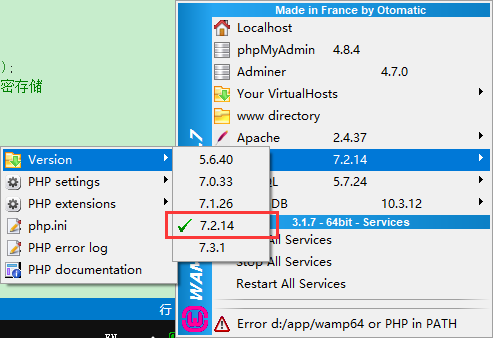
安装环境
PHP:7.2.14
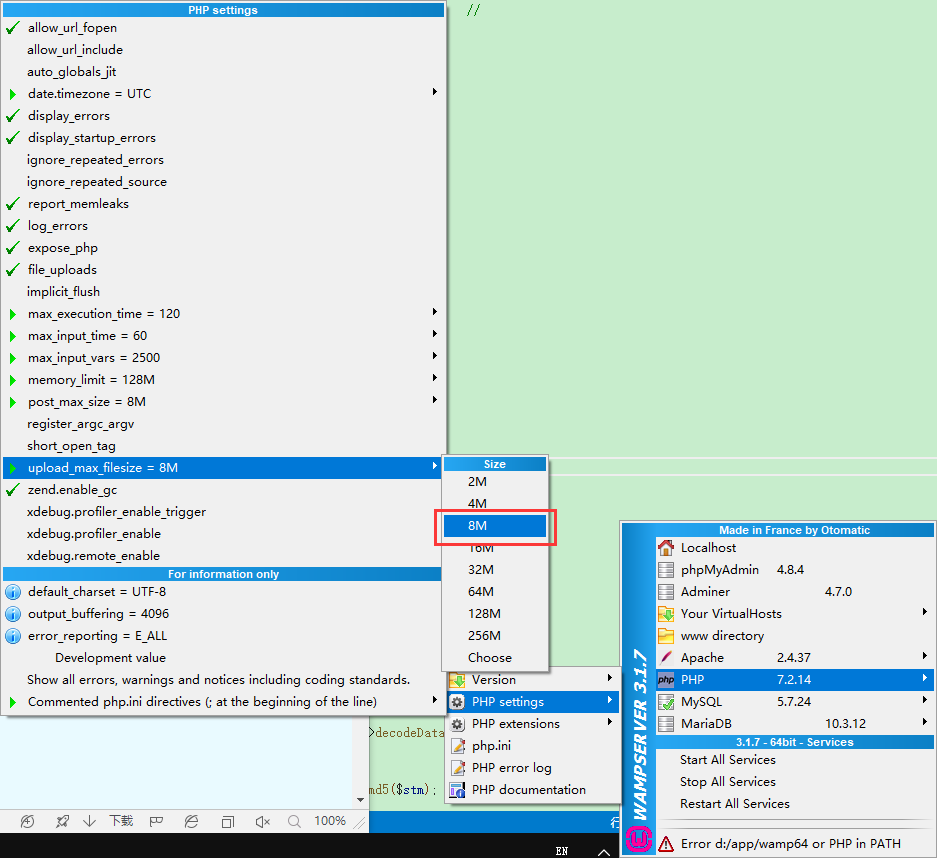
调整块大小
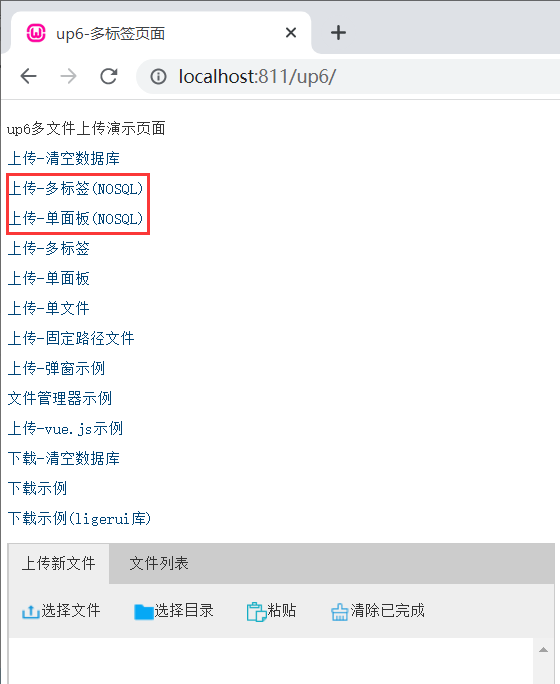
NOSQL
NOSQL不需要任何配置,可以直接访问测试
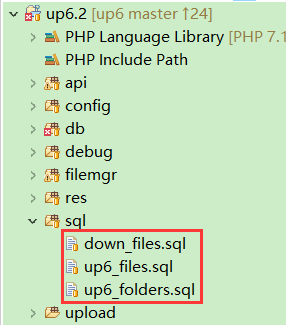
SQL
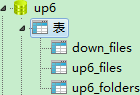
创建数据库
您可以直接复制脚本进行创建
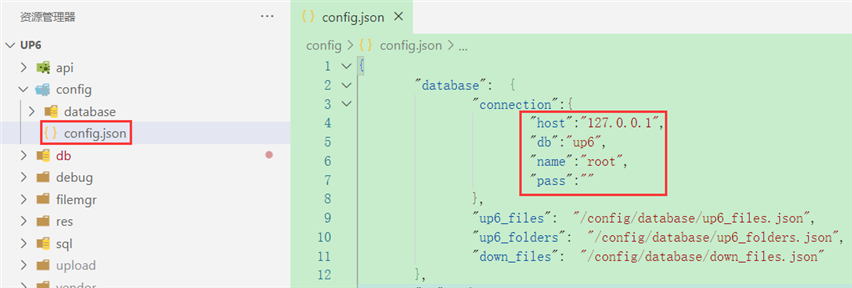
配置数据库连接
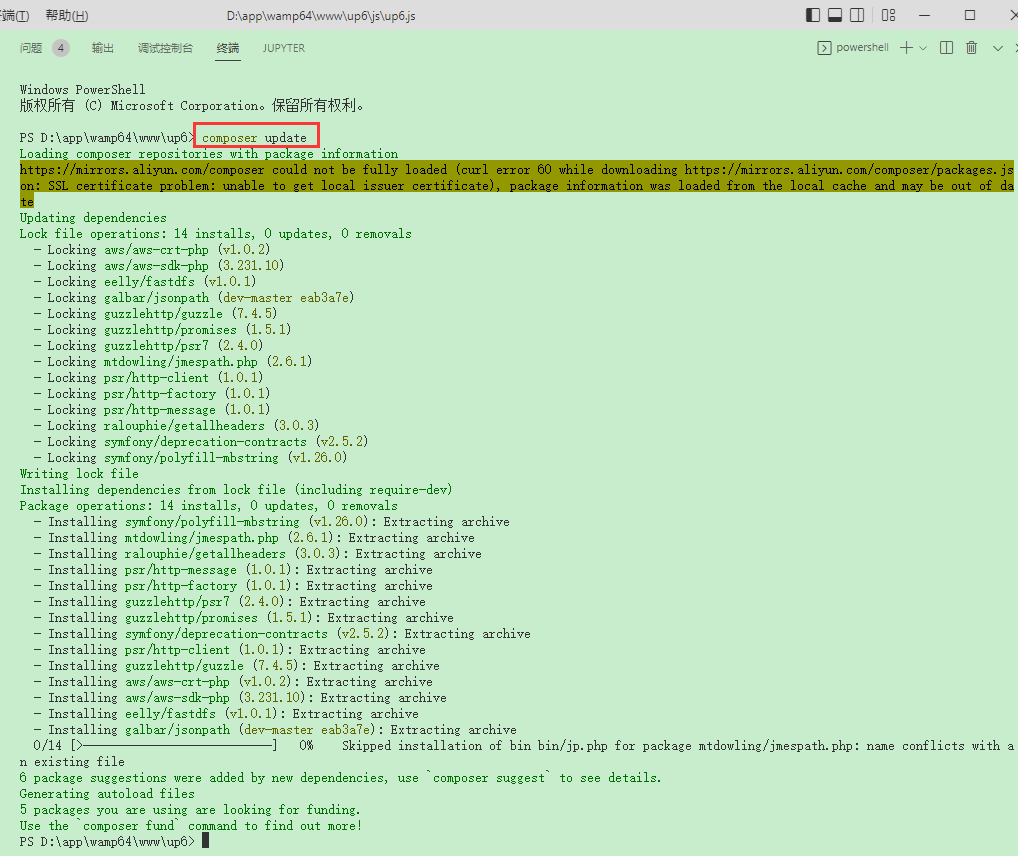
安装依赖
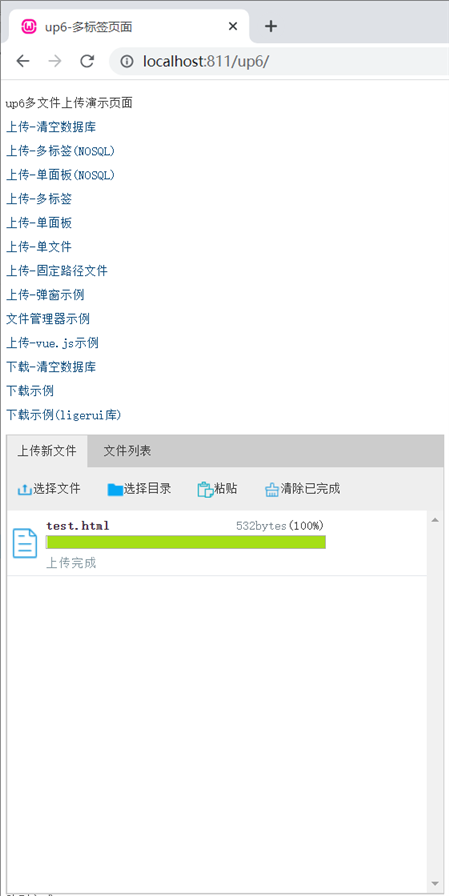
访问页面进行测试
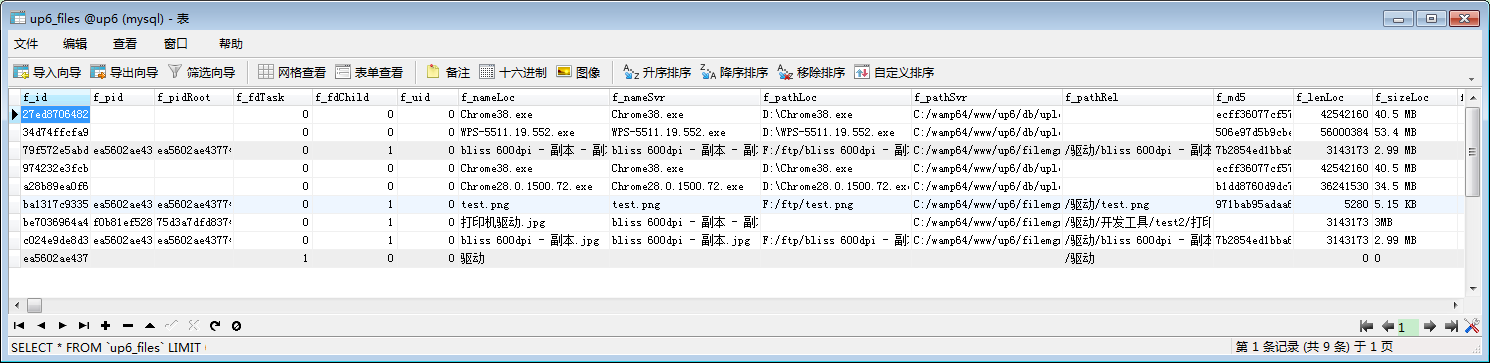
数据表中的数据
效果预览
文件上传
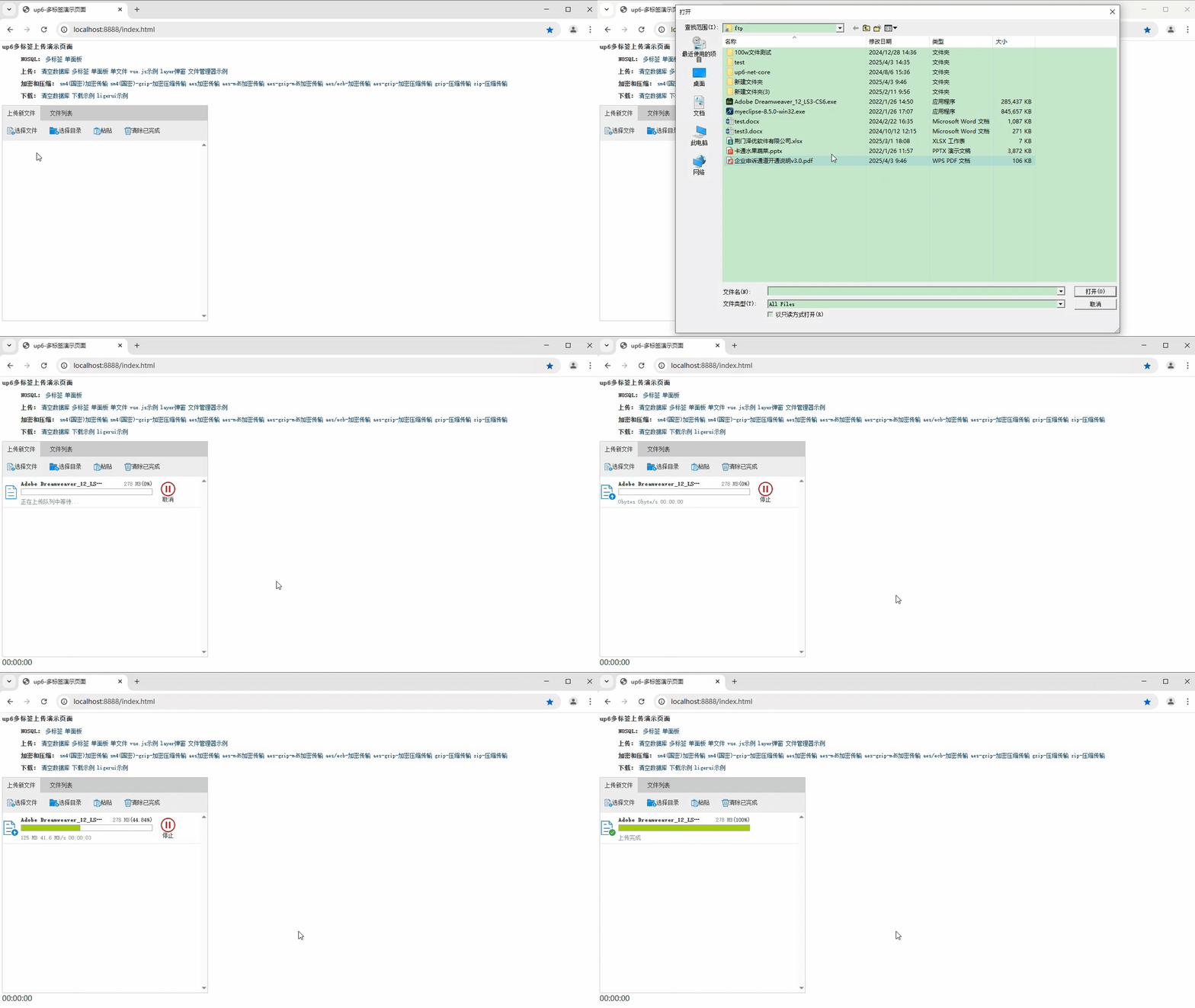
文件刷新续传
支持离线保存文件进度,在关闭浏览器,刷新浏览器后进行不丢失,仍然能够继续上传

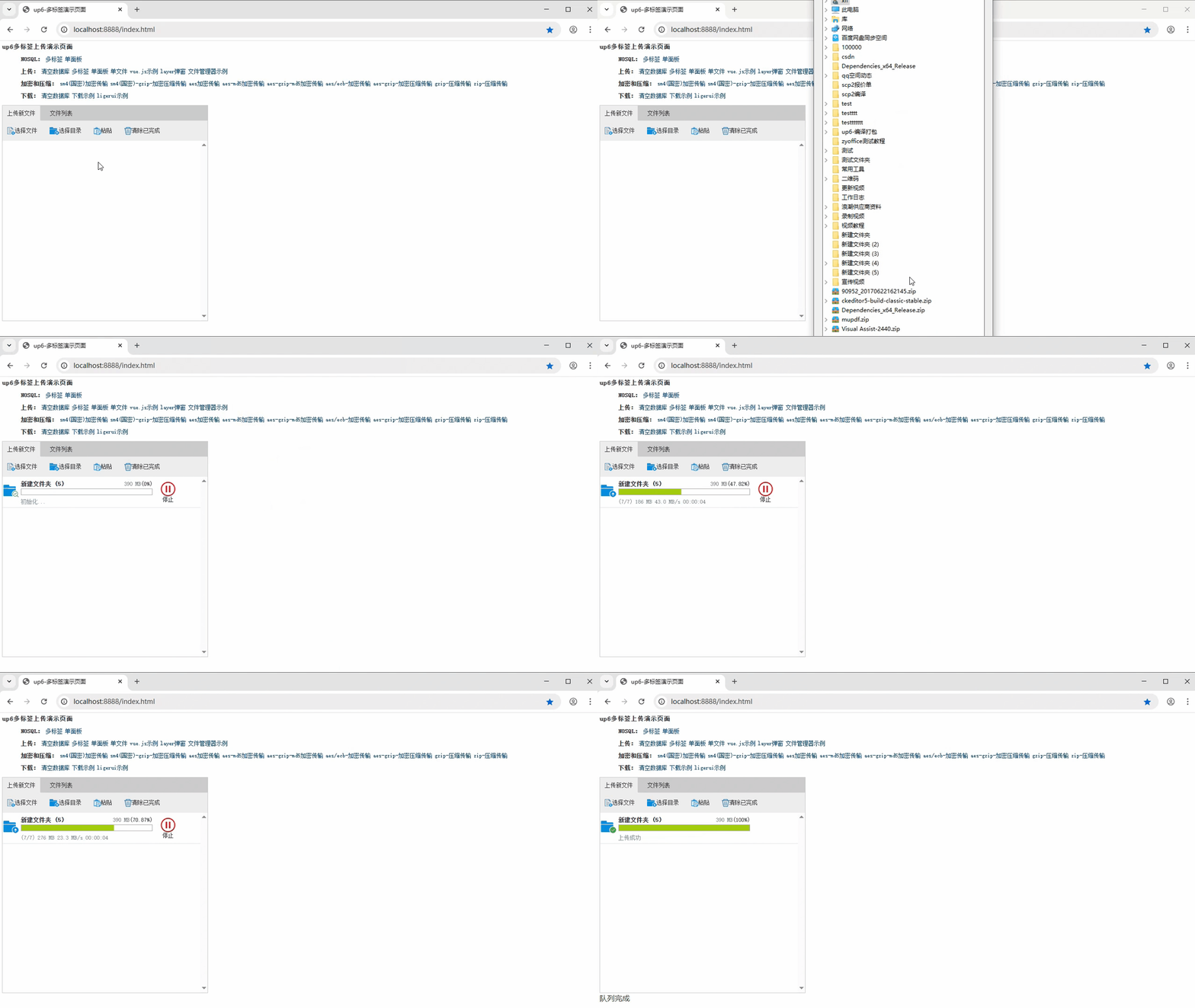
文件夹上传
支持上传文件夹并保留层级结构,同样支持进度信息离线保存,刷新页面,关闭页面,重启系统不丢失上传进度。
免费下载示例

火山引擎视频云技术社区,是面向 AI 音视频开发者的技术交流平台。这里汇聚源自抖音、豆包等亿级 DAU 产品的 RTC、直播、点播、AI 媒体处理、音视频互动技术,提供接入指南、最佳实践、性能调优、场景案例、Demo 代码、开源项目、白皮书和 API 文档。社区汇聚官方工程师与一线开发者,为 AI 视频通话、数字人、AI 视频处理等应用的开发与落地提供技术支持。
更多推荐
 13
13 0
0- 0


 已为社区贡献16条内容

所有评论(0)