教培机构线上化转型的技术架构——视频转码、直播体系与多端同步设计
引言
教培机构线上化转型的核心技术挑战不在于"做个网站",而在于构建一套支撑视频内容管理、直播互动、多端学习同步和海量数据处理的系统架构。线下课程搬到线上涉及内容结构化重组、视频转码分发、实时互动直播、跨端学习进度同步等多个技术模块的协作。
本文从系统架构设计的角度,讨论教培机构线上化场景下的几个关键技术实现:视频直传与转码回调机制、直播房间的状态管理与录播自动关联、多端学习进度的心跳同步与对账、课程内容的树形结构建模与缓存策略。
一、课程内容结构化建模
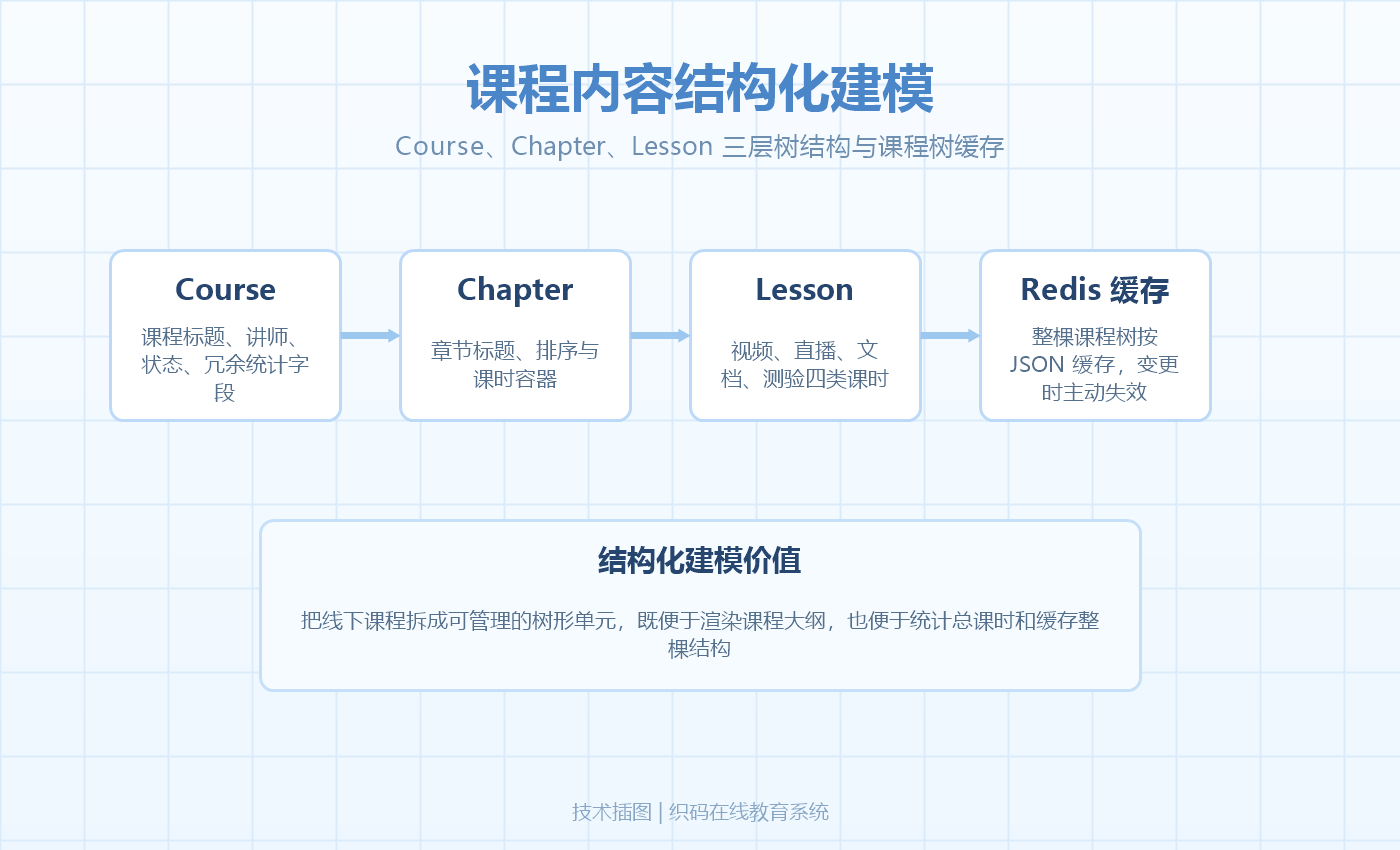
1.1 课程内容的数据模型
线下课程搬到线上,第一步是将课程内容拆分为可管理的结构化单元。一个课程包含多个章节(Chapter),每个章节包含多个课时(Lesson),课时是学习的最小单元:
// 课程实体
public class Course {
    private Long courseId;
    private String title;
    private String coverUrl;
    private String description;
    private Long lecturerId;          // 讲师ID
    private CourseStatus status;       // DRAFT / PUBLISHED / ARCHIVED
    private Integer totalLessons;      // 课时总数(冗余字段)
    private Integer totalDuration;     // 总时长(秒,冗余字段)
    private LocalDateTime publishedAt;
}

// 章节实体
public class Chapter {
    private Long chapterId;
    private Long courseId;
    private String title;
    private Integer sortOrder;          // 排序
    private List<Lesson> lessons;
}

// 课时实体(学习最小单元)
public class Lesson {
    private Long lessonId;
    private Long chapterId;
    private String title;
    private LessonType type;            // VIDEO / LIVE / DOCUMENT / QUIZ
    private Integer duration;           // 时长(秒)
    private Integer sortOrder;
    private Boolean freePreview;        // 是否免费试看
    private String vodVideoId;          // 关联的VOD视频ID(VIDEO类型)
    private String ossKey;              // 关联的文档OSS Key(DOCUMENT类型)
}
totalLessons 和 totalDuration 做冗余存储——课程列表页展示时避免对章节和课时做 COUNT + SUM 聚合查询。课时变更时同步更新冗余字段:
@Transactional
public void onLessonChanged(Long courseId) {
    Course course = courseRepo.findById(courseId).orElseThrow();
    course.setTotalLessons(lessonRepo.countByCourseId(courseId));
    course.setTotalDuration(lessonRepo.sumDurationByCourseId(courseId));
    courseRepo.save(course);
}
1.2 课程树缓存
课程结构数据读取频率高(每次进入课程详情页都要查),写入频率低(讲师编辑时才变),适合做缓存。缓存设计为两层:
请求 → Redis 缓存 → 数据库
         ↓ 缓存结构
    course:structure:{courseId} → JSON
    (包含 chapters + lessons 完整树结构)
public CourseStructure getCourseStructure(Long courseId) {
    String key = "course:structure:" + courseId;
    String cached = redisTemplate.opsForValue().get(key);

    if (cached != null) {
        return JsonUtils.parse(cached, CourseStructure.class);
    }

    // 查库:一次查询获取章节,一次查询获取所有课时,内存中组装树
    List<Chapter> chapters = chapterRepo.findByCourseIdOrderBySortOrder(courseId);
    List<Lesson> lessons = lessonRepo.findByCourseIdOrderBySortOrder(courseId);

    // 按 chapterId 分组,组装树结构
    Map<Long, List<Lesson>> lessonMap = lessons.stream()
        .collect(Collectors.groupingBy(Lesson::getChapterId));
    chapters.forEach(ch -> ch.setLessons(lessonMap.get(ch.getChapterId())));

    CourseStructure structure = new CourseStructure(courseId, chapters);
    redisTemplate.opsForValue().set(key, JsonUtils.stringify(structure), 1, TimeUnit.HOURS);
    return structure;
}
课程结构变更(增删改课时)时主动清除缓存:
public void publishLessonChange(Long courseId) {
    redisTemplate.delete("course:structure:" + courseId);
}
二、视频直传与转码回调
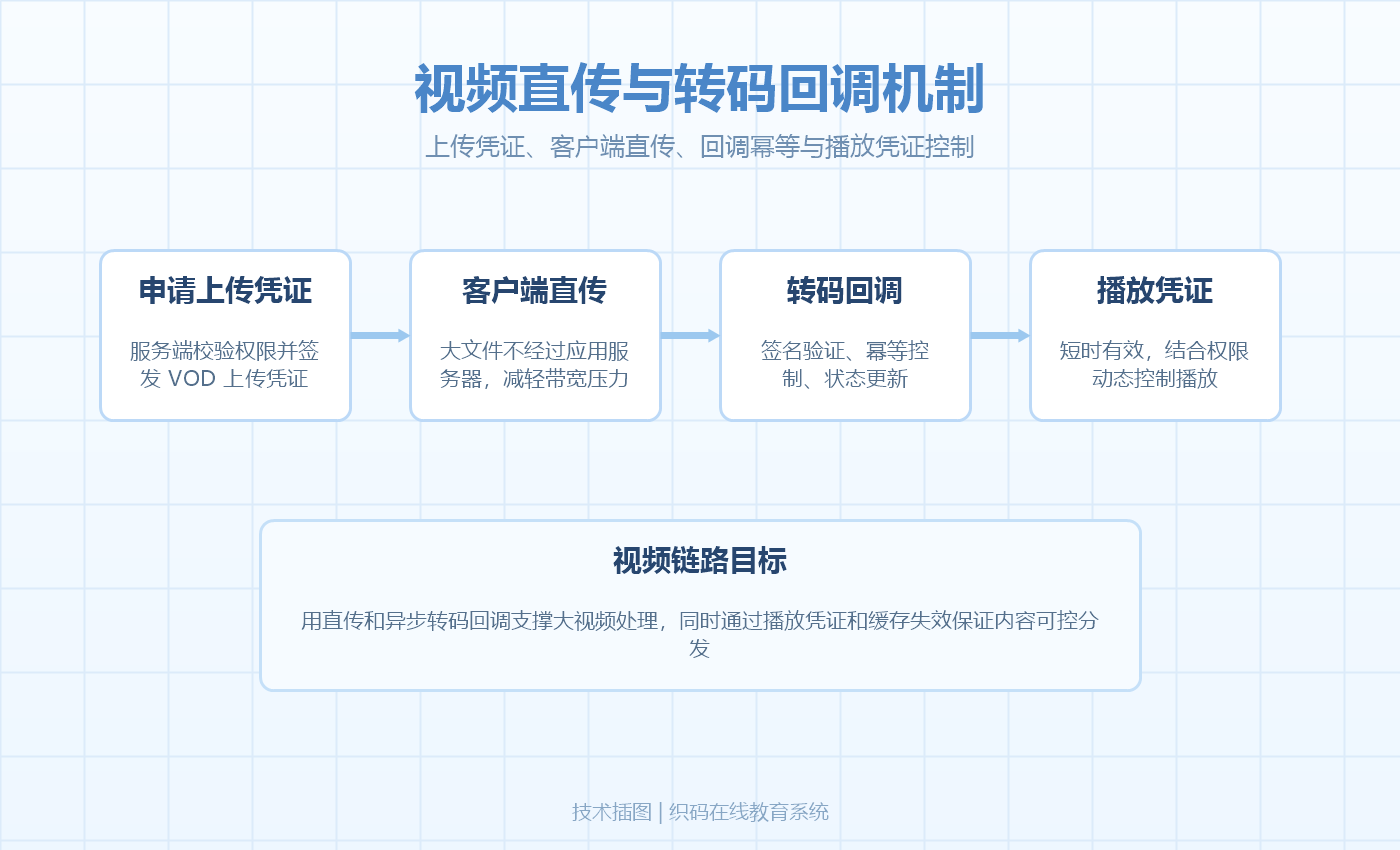
2.1 客户端直传方案
视频文件体积大,如果先上传到应用服务器再转发到 VOD,服务器带宽和内存压力很大。采用客户端直传方案——前端直接上传到云存储,应用服务器只负责签发上传凭证:
// 签发 VOD 上传凭证
@PostMapping("/api/vod/upload-auth")
public Result<VodUploadAuthVO> getUploadAuth(@RequestBody VodUploadAuthDTO dto) {
    // 权限校验:当前用户是否有权上传该课程的课时
    lessonService.assertUploadPermission(dto.getLessonId(), SecurityUtils.getCurrentUserId());

    // 调用 VOD API 创建上传凭证
    CreateUploadVideoRequest request = new CreateUploadVideoRequest()
        .setTitle(dto.getTitle())
        .setFileName(dto.getFileName())
        .setFileSize(dto.getFileSize())
        .setCateId(vodConfig.getCategory())  // VOD 分类ID
        .setTemplateGroupId(vodConfig.getTranscodeTemplate()); // 转码模板

    CreateUploadVideoResponse response = vodClient.createUploadVideo(request);

    // 预关联 videoId 到课时(状态标记为"转码中")
    lessonService.bindVodVideo(dto.getLessonId(), response.getVideoId());

    return Result.success(VodUploadAuthVO.builder()
        .uploadAuth(response.getUploadAuth())
        .uploadAddress(response.getUploadAddress())
        .videoId(response.getVideoId())
        .build());
}
上传流程:
前端 → 应用服务器:请求上传凭证
应用服务器 → VOD API:创建上传任务,获取凭证
应用服务器 → 前端:返回凭证 + uploadAddress
前端 → VOD CDN:直接上传文件(不经过应用服务器)
VOD → 应用服务器:转码完成回调(HTTP POST)
应用服务器:更新课时状态为"可用"
2.2 转码回调处理
VOD 转码是异步过程,完成后通过 HTTP 回调通知应用服务器。回调处理需要做签名验证和幂等控制:
@PostMapping("/api/vod/transcode-callback")
public Result<Void> onTranscodeComplete(
    @RequestHeader("X-VOD-Signature") String signature,
    @RequestBody String rawBody
) {
    // 1. 签名验证(防止伪造回调)
    String expected = hmacSha256(rawBody, vodConfig.getCallbackSecret());
    if (!MessageDigest.isEqual(signature.getBytes(), expected.getBytes())) {
        log.warn("VOD 回调签名验证失败");
        return Result.fail("签名验证失败");
    }

    VodCallbackDTO dto = JsonUtils.parse(rawBody, VodCallbackDTO.class);

    // 2. 幂等控制(VOD可能重复回调)
    String dedupKey = "vod:callback:" + dto.getVideoId();
    if (!redisTemplate.opsForValue().setIfAbsent(dedupKey, "1", 24, TimeUnit.HOURS)) {
        log.info("VOD 回调重复处理,videoId={}", dto.getVideoId());
        return Result.success();
    }

    // 3. 更新课时状态
    Lesson lesson = lessonRepo.findByVodVideoId(dto.getVideoId());
    if (lesson != null) {
        lesson.setStatus(LessonStatus.AVAILABLE);
        lesson.setDuration(dto.getDuration());
        lesson.setPlayUrl(dto.getPlayUrl());
        lessonRepo.save(lesson);

        // 4. 更新课程冗余字段
        courseService.onLessonChanged(lesson.getCourseId());

        // 5. 清除课程结构缓存
        redisTemplate.delete("course:structure:" + lesson.getCourseId());
    }

    return Result.success();
}
2.3 多码率与 CDN 分发
VOD 自动进行多码率转码(240P/360P/720P/1080P),播放端根据网络条件自适应切换。播放凭证有时效限制,每次播放都需要向服务端请求:
// 获取播放凭证(带权限校验)
@GetMapping("/api/vod/play-auth/{lessonId}")
public Result<PlayAuthVO> getPlayAuth(@PathVariable Long lessonId) {
    Long userId = SecurityUtils.getCurrentUserId();

    // 1. 权限校验:学员是否已购买该课程
    if (!accessService.hasAccess(userId, lessonId)) {
        // 检查是否免费试看
        Lesson lesson = lessonRepo.findById(lessonId).orElseThrow();
        if (!lesson.getFreePreview()) {
            throw new AccessDeniedException("请先购买课程");
        }
    }

    // 2. 获取 VOD 播放凭证(有效期100秒)
    Lesson lesson = lessonRepo.findById(lessonId).orElseThrow();
    GetPlayInfoResponse playInfo = vodClient.getPlayInfo(lesson.getVodVideoId());

    return Result.success(PlayAuthVO.builder()
        .playAuth(playInfo.getPlayAuth())
        .playUrl(playInfo.getPlayInfoList().get(0).getPlayUrl())
        .expiresIn(100)
        .build());
}
播放凭证短期有效的设计有两个好处:防止凭证被盗用后长期播放;每次播放都经过服务端权限校验,学员退款后凭证立刻失效。
2.4 课件文档在线预览
PPT、PDF 等课件通过 OSS 存储,生成带时效的预览 URL 实现在线预览:
@GetMapping("/api/resource/preview-url/{resourceId}")
public Result<String> getPreviewUrl(@PathVariable Long resourceId) {
    Resource resource = resourceRepo.findById(resourceId).orElseThrow();

    // 生成带签名的预览URL(防盗链,1小时内有效)
    String previewUrl = ossService.generateSignedUrl(
        resource.getOssKey(),
        Duration.ofHours(1),
        "inline"  // Content-Disposition: inline(浏览器内嵌预览)
    );

    // 记录预览日志
    accessLogService.logPreview(SecurityUtils.getCurrentUserId(), resourceId);

    return Result.success(previewUrl);
}
Content-Disposition: inline 确保浏览器内嵌预览而非触发下载。签名 URL 包含过期时间戳,即使 URL 泄露也无法长期使用。
三、直播房间的状态管理与录播关联
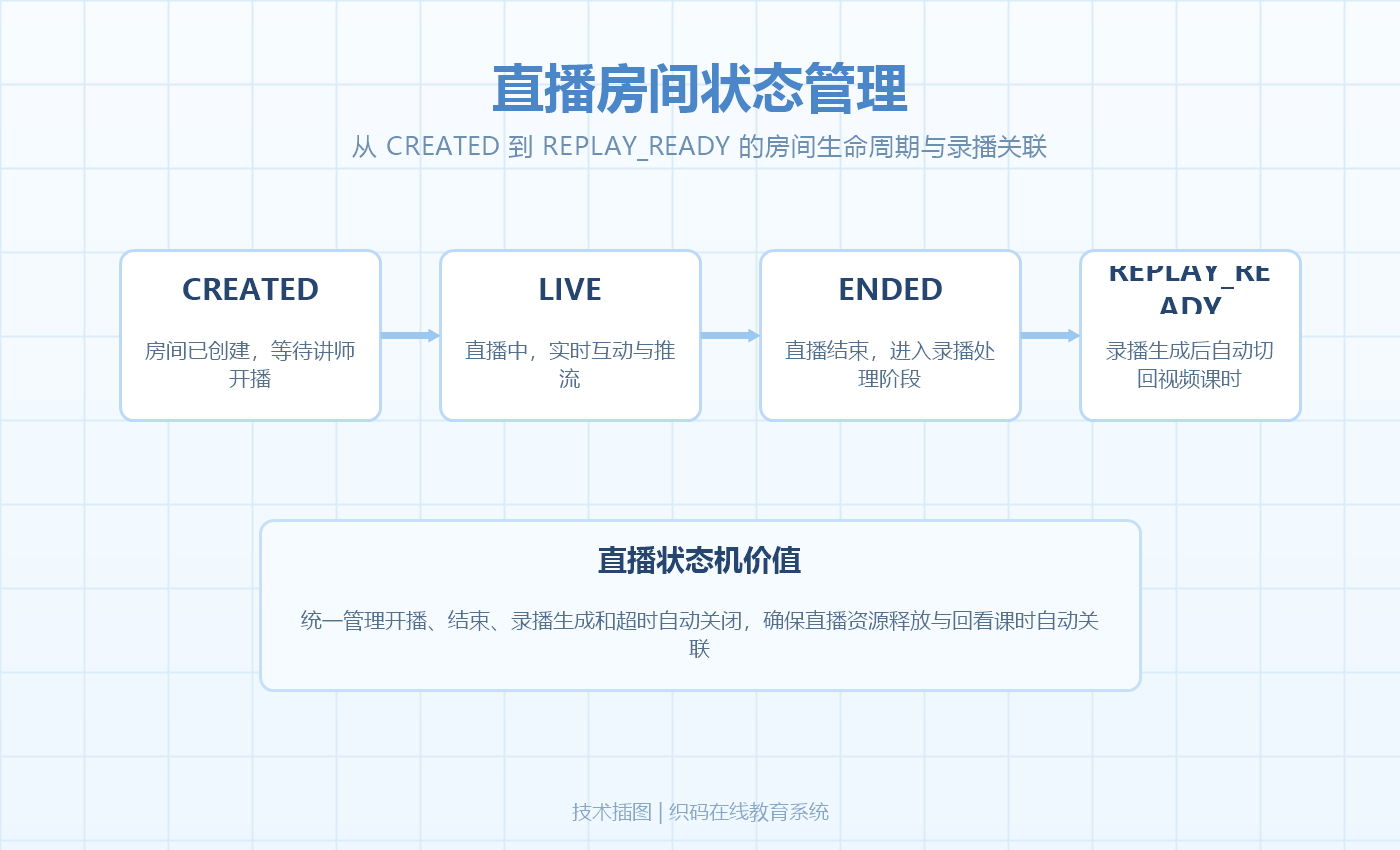
3.1 直播房间状态机
直播课时关联一个直播房间,房间有明确的生命周期状态:
public enum LiveRoomStatus {
    CREATED,       // 已创建,未开始
    LIVE,          // 直播中
    ENDED,         // 直播结束,录播处理中
    REPLAY_READY   // 录播已生成,可回看
}
状态流转:
CREATED → LIVE:讲师点击"开始直播"LIVE → ENDED:讲师点击"结束直播"或超时自动结束ENDED → REPLAY_READY:直播服务回调录播处理完成
public class LiveLesson {
    private Long lessonId;
    private Long liveRoomId;          // 关联的直播间ID
    private LocalDateTime startAt;   // 计划开始时间
    private Integer durationMinutes; // 预计时长
    private String liveTitle;
    private LiveRoomStatus status;
    private String replayVideoId;    // 录播视频ID(REPLAY_READY后填充)
}
3.2 直播开始与结束
// 开始直播
@Transactional
public void startLive(Long lessonId, Long lecturerId) {
    LiveLesson lesson = liveLessonRepo.findById(lessonId).orElseThrow();

    // 校验权限
    if (!lesson.getLecturerId().equals(lecturerId)) {
        throw new AccessDeniedException("无权操作此直播课时");
    }

    // 状态校验:只有 CREATED 状态可以开始
    if (lesson.getStatus() != LiveRoomStatus.CREATED) {
        throw new IllegalStateException("当前状态不允许开始直播: " + lesson.getStatus());
    }

    // 调用直播服务创建推流地址
    String pushUrl = liveService.createPushUrl(lesson.getLiveRoomId());

    lesson.setStatus(LiveRoomStatus.LIVE);
    lesson.setActualStartAt(LocalDateTime.now());
    liveLessonRepo.save(lesson);

    // 异步通知已报名学员
    eventPublisher.publishEvent(new LiveStartedEvent(lessonId));

    return pushUrl;
}

// 结束直播
@Transactional
public void endLive(Long lessonId, Long lecturerId) {
    LiveLesson lesson = liveLessonRepo.findById(lessonId).orElseThrow();

    if (lesson.getStatus() != LiveRoomStatus.LIVE) {
        throw new IllegalStateException("当前状态不允许结束直播");
    }

    // 调用直播服务结束推流,触发录播处理
    liveService.stopPush(lesson.getLiveRoomId());

    lesson.setStatus(LiveRoomStatus.ENDED);
    lesson.setActualEndAt(LocalDateTime.now());
    liveLessonRepo.save(lesson);
}
3.3 录播自动关联
直播结束后,直播服务异步录制并转码为 VOD 视频。转码完成后通过回调通知应用服务器,自动关联到课时:
// 直播录播完成回调
@PostMapping("/api/live/replay-callback")
public Result<Void> onReplayReady(
    @RequestHeader("X-Live-Signature") String signature,
    @RequestBody String rawBody
) {
    // 签名验证
    verifySignature(signature, rawBody);

    LiveReplayCallbackDTO dto = JsonUtils.parse(rawBody, LiveReplayCallbackDTO.class);

    LiveLesson lesson = liveLessonRepo.findByLiveRoomId(dto.getRoomId());
    if (lesson != null && lesson.getStatus() == LiveRoomStatus.ENDED) {
        lesson.setStatus(LiveRoomStatus.REPLAY_READY);
        lesson.setReplayVideoId(dto.getVideoId());
        lesson.setDuration(dto.getDuration());
        liveLessonRepo.save(lesson);

        // 课时类型从 LIVE 转为 VIDEO(可回看的录播)
        Lesson baseLesson = lessonRepo.findById(lesson.getLessonId()).orElseThrow();
        baseLesson.setType(LessonType.VIDEO);
        baseLesson.setVodVideoId(dto.getVideoId());
        lessonRepo.save(baseLesson);

        // 清除课程结构缓存
        redisTemplate.delete("course:structure:" + baseLesson.getCourseId());
    }

    return Result.success();
}
直播结束后课时类型从 LIVE 变为 VIDEO——学员后续回看走录播视频的播放流程,不再依赖直播服务。
3.4 直播超时自动结束
讲师可能忘记点"结束直播",导致房间一直占用直播服务资源。用定时任务检测超时直播:
@Scheduled(fixedRate = 60000) // 每分钟检测一次
public void autoEndOvertimeLive() {
    List<LiveLesson> liveLessons = liveLessonRepo.findByStatus(LiveRoomStatus.LIVE);
    LocalDateTime now = LocalDateTime.now();

    for (LiveLesson lesson : liveLessons) {
        // 超过预计时长2倍仍未结束,自动关闭
        LocalDateTime timeoutAt = lesson.getActualStartAt()
            .plusMinutes(lesson.getDurationMinutes() * 2);

        if (now.isAfter(timeoutAt)) {
            log.warn("直播超时自动结束,lessonId={}", lesson.getLessonId());
            endLive(lesson.getLessonId(), lesson.getLecturerId());
        }
    }
}
四、多端学习进度同步
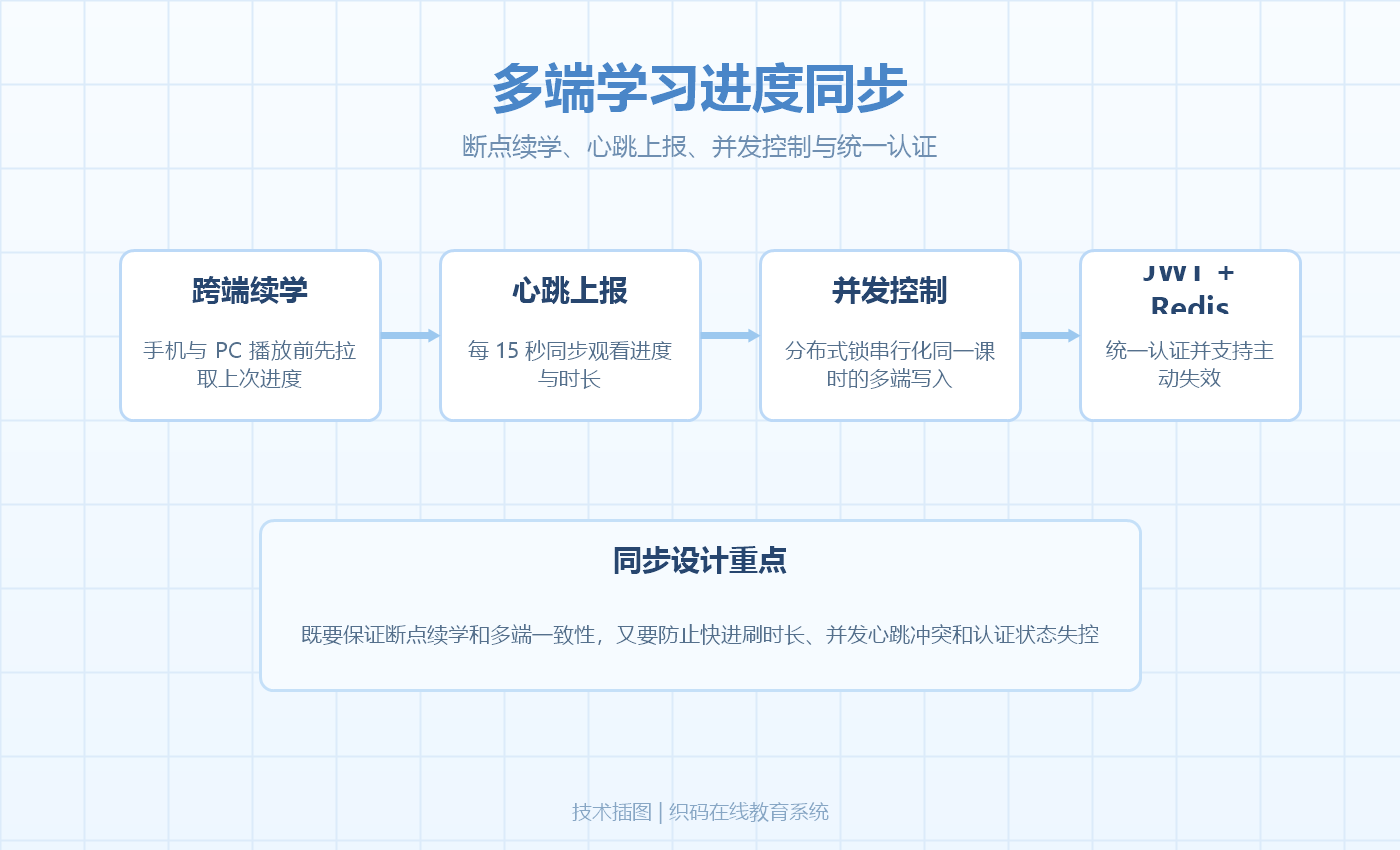
4.1 跨端断点续学
学员可能在手机上看了一半,切换到 PC 端继续看。断点续学的核心是进度数据服务端集中存储,各端播放前拉取上次进度:
// 前端播放器初始化
async function initPlayer(lessonId) {
    // 1. 拉取上次进度
    const progress = await api.getLessonProgress(lessonId)

    // 2. 拉取播放凭证
    const playAuth = await api.getPlayAuth(lessonId)

    // 3. 初始化播放器,从上次位置开始
    player = new AliPlayer({
        vid: lesson.vodVideoId,
        playauth: playAuth.playAuth,
        startTime: progress.watchedSeconds > 30 ? progress.watchedSeconds : 0
    })

    // 4. 心跳上报
    setInterval(() => {
        if (!player.paused && !player.ended) {
            api.reportProgress({
                lessonId,
                watchedSeconds: Math.floor(player.currentTime),
                duration: Math.floor(player.duration)
            })
        }
    }, 15000)

    // 5. 播放结束上报
    player.on('ended', () => {
        api.reportProgress({
            lessonId,
            watchedSeconds: Math.floor(player.duration),
            duration: Math.floor(player.duration),
            completed: true
        })
    })
}
4.2 服务端进度对账
心跳上报间隔 15 秒,网络问题可能导致最后几条心跳丢失。服务端做防回退 + 对账:
@PostMapping("/api/learning/heartbeat")
public Result<Void> reportProgress(@RequestBody ProgressHeartbeatDTO dto) {
    Long userId = SecurityUtils.getCurrentUserId();

    LearningProgress progress = progressRepo
        .findByUserIdAndLessonId(userId, dto.getLessonId());

    if (progress == null) {
        progress = new LearningProgress();
        progress.setUserId(userId);
        progress.setLessonId(dto.getLessonId());
        progress.setWatchedSeconds(0);
    }

    // 防回退:只接受比当前更大的进度
    if (dto.getWatchedSeconds() > progress.getWatchedSeconds()) {
        // 校验心跳间隔合理性(防快进)
        long delta = dto.getWatchedSeconds() - progress.getWatchedSeconds();
        double maxAcceptableDelta = 15 * 2.0 + 5; // 15秒间隔 × 2倍速 + 5秒容差

        if (delta < maxAcceptableDelta) {
            progress.setWatchedSeconds(dto.getWatchedSeconds());
            progress.setLastReportAt(LocalDateTime.now());
        }
    }

    // 完成判定:观看时长 ≥ 视频总时长的 90%
    if (dto.getDuration() != null && dto.getDuration() > 0) {
        double completionRate = (double) progress.getWatchedSeconds() / dto.getDuration();
        if (completionRate >= 0.9 && !progress.getCompleted()) {
            progress.setCompleted(true);
            progress.setCompletedAt(LocalDateTime.now());
            // 触发章节/课程完成事件
            eventPublisher.publishEvent(new LessonCompletedEvent(userId, dto.getLessonId()));
        }
    }

    progressRepo.save(progress);
    return Result.success();
}
4.3 并发上报处理
学员同时打开两个端播放同一课时(如手机和PC),两个端的心跳会并发到达。用分布式锁串行化:
@PostMapping("/api/learning/heartbeat")
public Result<Void> reportProgress(@RequestBody ProgressHeartbeatDTO dto) {
    Long userId = SecurityUtils.getCurrentUserId();
    String lockKey = "progress:" + userId + ":" + dto.getLessonId();

    RLock lock = redissonClient.getLock(lockKey);
    try {
        if (!lock.tryLock(3, TimeUnit.SECONDS)) {
            // 获取锁超时,跳过本次上报(下次会再来)
            return Result.success();
        }

        // ... 进度更新逻辑 ...

    } finally {
        if (lock.isHeldByCurrentThread()) {
            lock.unlock();
        }
    }
}
tryLock(3, TimeUnit.SECONDS) 设置 3 秒超时——如果另一个端正在写,本次心跳直接跳过,下一个 15 秒周期会重新上报,不影响最终进度准确性。
五、多端 API 设计与认证
5.1 统一 API 网关
App、小程序、H5、PC 共用同一套后端 API,通过网关层统一处理认证和限流:
App / 小程序 / H5 / PC
        ↓
   API 网关
   ├── 认证(Token 校验)
   ├── 限流(按用户/IP)
   ├── 请求日志
   └── 路由分发
        ↓
   后端微服务
不同端的差异化通过请求头标识,后端按端做差异化处理:
@Component
public class PlatformInterceptor implements HandlerInterceptor {

    @Override
    public boolean preHandle(HttpServletRequest request, ...) {
        String platform = request.getHeader("X-Platform"); // app / miniapp / h5 / pc
        request.setAttribute("platform", platform);
        return true;
    }
}
5.2 跨端 Token 认证
学员在 PC 端登录后,手机端不需要重新登录。方案是采用统一的 JWT Token + Redis Session:
// 登录成功后生成 Token
public LoginResult login(String phone, String password) {
    User user = userService.verify(phone, password);

    // 生成 JWT Token
    String token = jwtUtil.generate(user.getId(), user.getPhone());

    // 存入 Redis(支持跨端共享)
    String sessionKey = "session:" + user.getId();
    redisTemplate.opsForValue().set(sessionKey, token, 7, TimeUnit.DAYS);

    return LoginResult.builder()
        .token(token)
        .userId(user.getId())
        .expiresIn(7 * 24 * 3600)
        .build();
}

// Token 校验(所有端共用)
public boolean verifyToken(String token) {
    Long userId = jwtUtil.parseUserId(token);
    if (userId == null) return false;

    String sessionKey = "session:" + userId;
    String storedToken = redisTemplate.opsForValue().get(sessionKey);

    // 比对 Redis 中的 Token,支持踢人(删除 Session 即可让 Token 失效)
    return token.equals(storedToken);
}
JWT 自身携带用户信息,无状态解析;Redis 存一份活跃 Token,支持主动失效(如改密码后踢下线)。两者结合兼顾性能和可控性。
六、总结
本文讨论了教培机构线上化转型中几个核心技术模块的设计思路:
- 课程结构建模采用 Course → Chapter → Lesson 三层树结构,冗余字段避免聚合查询,课程树缓存用 JSON 存储完整结构,变更时主动失效
- 视频直传采用客户端直传方案减轻服务器压力,转码回调通过签名验证 + 幂等控制保证安全,播放凭证短期有效实现权限动态控制
- 直播房间用状态机管理生命周期(CREATED → LIVE → ENDED → REPLAY_READY),录播完成后自动关联到课时,超时自动结束防止资源泄漏
- 多端进度同步通过心跳上报 + 防回退 + 防快进 + 分布式锁串行化,90% 阈值判定完成,跨端拉取进度实现断点续学
- 跨端认证采用 JWT + Redis Session 方案,JWT 无状态解析保证性能,Redis 存储支持主动失效
这些模块的共同特点是:异步回调的幂等性控制、跨端数据的一致性保障、缓存与数据库的一致性维护是工程实现的核心难点。在实际项目中需要根据用户规模和业务要求做针对性设计。

火山引擎视频云技术社区,是面向 AI 音视频开发者的技术交流平台。这里汇聚源自抖音、豆包等亿级 DAU 产品的 RTC、直播、点播、AI 媒体处理、音视频互动技术,提供接入指南、最佳实践、性能调优、场景案例、Demo 代码、开源项目、白皮书和 API 文档。社区汇聚官方工程师与一线开发者,为 AI 视频通话、数字人、AI 视频处理等应用的开发与落地提供技术支持。
更多推荐
 19
19 0
0- 0


 已为社区贡献1条内容

所有评论(0)